
Bhulekh UK is the official online land records portal of the Uttarakhand government. You can use it to check ownership details, khasra numbers, khatauni records, village maps and mutation status for any piece of land in the state. The official website is bhulekh.uk.gov.in and it is free to use. This guide tells you exactly what you can check, how to search and what to do when something does not work.
- What is Bhulekh UK?
- What is Devbhoomi Bhulekh and Is It the Same as Bhulekh UK?
- What Can You Check on Bhulekh UK?
- How to Check Bhulekh UK Online — Step by Step
- What is Khasra Number and What is Khatauni in Uttarakhand?
- How to Check Bhulekh UK District Wise
- How to Check Village Map and Naksha on Bhulekh UK
- What is Swamitva Status on Bhulekh UK?
- How to Get a Copy of Land Records — Fees and Process
- Common Problems on Bhulekh UK and How to Solve Them
- E Registration Uttarakhand — How It Connects to Bhulekh
- Latest Updates on Bhulekh UK in 2026
What is Bhulekh UK?
Bhulekh UK is a digital system created by the Uttarakhand government to store and manage all land records for the state. The word Bhulekh comes from two Hindi words — Bhu meaning land and Lekh meaning records. So Bhulekh simply means land records.
Before this portal was created, all land records in Uttarakhand were kept in paper files at local Tehsil offices. People had to visit the office, wait in queues and pay for getting copies. The whole process was slow and sometimes not transparent. Bhulekh UK solved this by putting everything online. Now anyone can check land records from their phone or computer without visiting any government office.
The portal was built under the National Land Records Modernization Programme which is now called the Digital India Land Records Modernization Programme or DILRMP. It is managed by the Revenue Department of the Uttarakhand government.
What is Devbhoomi Bhulekh and Is It the Same as Bhulekh UK?
Yes. Devbhoomi Bhulekh is another name for the same portal. Devbhoomi is a common term used for Uttarakhand which means the land of the gods. So Devbhoomi Bhulekh just means Uttarakhand land records. Both names point to the same official portal at bhulekh.uk.gov.in.
Some people also search for UK Bhulekh, Bhulekh Uttarakhand or Uttarakhand land records. All of these take you to the same place.
What Can You Check on Bhulekh UK?
Here is what the portal gives you access to:
- Khasra or Gata number details — survey number information for a specific plot
- Khatauni — a document showing ownership and land holding details
- Owner name search — find land held by any person using their name
- Registry number search — verify records using the computerised registration number
- Village map or Sajra Naksha — geographic layout of a village with all plots marked
- Mutation or Dakhil Kharij status — check if an ownership transfer has been recorded
- Swamitva status — check property card status under the Swamitva scheme for residential areas in villages
All of this is available 24 hours a day. No login is required for regular citizens.
How to Check Bhulekh UK Online — Step by Step
Go to the official portal at bhulekh.uk.gov.in. On the homepage you will see options like Public ROR, Tehsil Mutation Login and Swamitva Status. For checking land records click on Public ROR.
How to Search by Khasra or Gata Number
- Click on Public ROR on the homepage
- Select your District from the dropdown — for example Dehradun or Haridwar
- Select your Tehsil
- Select your Village
- Choose the Khasra or Gata Number option
- Enter your Khasra number
- Click Search and your land record will appear on screen
How to Search by Khata Number
- Follow Steps 1 to 4 above
- Choose the Khata Number option
- Enter your Khata number
- Click Search to see the full Khatauni record
How to Search by Owner Name
- Follow Steps 1 to 4 above
- Choose the Owner Name option
- A Hindi keyboard will appear on screen — use it to type the owner name in Hindi or select characters one by one
- Click Search and matching records will appear
Note: The name search uses a phonetic Hindi system so make sure you type the name in the way it appears in Hindi on the actual land document.
How to Search by Registry Number
- Follow Steps 1 to 4 above
- Choose the Registry Number option
- Enter the registry number from your property document
- Click Search to verify the record
What is Khasra Number and What is Khatauni in Uttarakhand?
These two terms confuse a lot of people. Here is the simplest way to understand them.
Difference Between Khasra and Khatauni
|
Term |
What It Means |
|
Khasra Number |
A unique number given to each individual plot of land in a village. Like a plot ID. |
|
Khatauni |
A record that shows all the land held by one person or family. One Khatauni can contain multiple Khasra numbers. |
|
Khata Number |
The account number linked to a Khatauni record. |
|
Gata Number |
Same as Khasra number — used in some districts of Uttarakhand. |
So when you want details of one specific plot, search by Khasra number. When you want all land owned by a person, look at their Khatauni using the Khata number.
How to Check Bhulekh UK District Wise
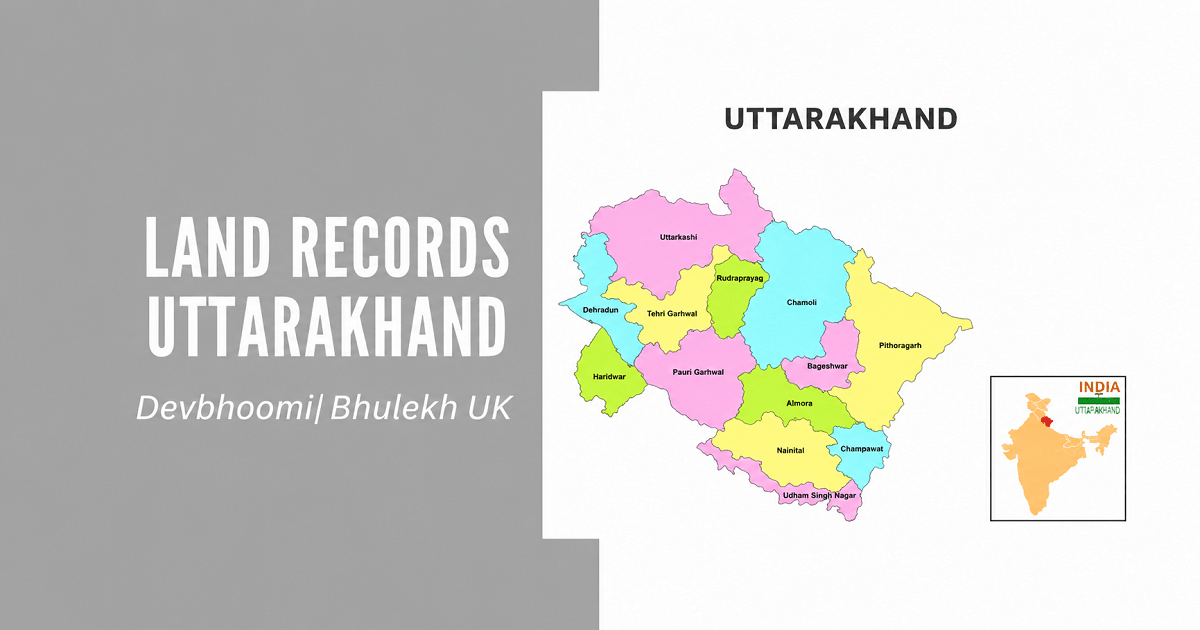
Bhulekh UK covers all 13 districts of Uttarakhand. Here are the districts you can search:
- Dehradun
- Haridwar
- Nainital
- Almora
- Pauri Garhwal
- Tehri Garhwal
- Uttarkashi
- Chamoli
- Rudraprayag
- Pithoragarh
- Champawat
- Bageshwar
- Udham Singh Nagar
For each district you need to further select the Tehsil and then the Village before searching. If your village is not showing in the list it may mean the records for that village have not been fully digitised yet. In that case visit your local Tehsil office.
How to Check Village Map and Naksha on Bhulekh UK
The Sajra Naksha is the village map that shows the geographic layout of every plot in the village. Here is how to access it:
- Go to bhulekh.uk.gov.in
- Click on Sajra Map or Naksha from the menu
- Select your District, Tehsil and Village
- A map of the village will load showing all survey numbers
- Click on any plot number to see the owner and land details linked to it
This map is useful when you want to see the exact shape, size and location of a plot before buying land. It helps you verify that the land shown on the map matches what the seller is showing you on the ground.
What is Swamitva Status on Bhulekh UK?
Swamitva is a central government scheme launched in 2020 to give property rights to people living in rural areas of India. Under this scheme residential plots in villages are surveyed using drones and property cards are given to the rightful owners.
You can check your Swamitva status on the Bhulekh UK portal by clicking on the Swamitva Status option on the homepage. Enter your district and village details to see whether the drone survey has been completed for your area and whether your property card has been issued.
This is especially important if you are a rural homeowner who wants to use your home as collateral for a bank loan. A Swamitva property card is recognised by banks as ownership proof.
How to Get a Copy of Land Records — Fees and Process
Viewing records online on Bhulekh UK is completely free. But if you need a certified physical copy of your land record you need to pay a fee and visit the Tehsil office.
|
Service |
Fee |
|
Viewing online |
Free |
|
First page of certified copy |
Rs 15 |
|
Each additional page |
Rs 5 |
|
Obtaining copy at Tehsil |
Visit with Aadhaar card and land details |
For getting a certified copy:
- Visit your local Tehsil office with your Aadhaar card
- Carry the Khasra number or Khata number of the land
- Fill the application form at the counter
- Pay the required fee
- Collect the certified copy — usually on the same day or within a day or two
Certified copies are needed for bank loans, court cases, property disputes, inheritance claims and government scheme applications.
Common Problems on Bhulekh UK and How to Solve Them
|
Problem |
Likely Reason |
Solution |
|
Village not showing in dropdown |
Records not fully digitised |
Visit local Tehsil office |
|
Owner name search not working |
Hindi name entered incorrectly |
Use the on-screen Hindi keyboard carefully |
|
Record showing wrong name |
Mutation not updated after purchase |
File a mutation application at the Tehsil |
|
Khasra number not found |
Wrong district or tehsil selected |
Recheck and select the correct area |
|
Website not loading |
Heavy traffic on the portal |
Try early morning or late evening |
|
Map not loading |
Browser compatibility issue |
Use Chrome or Firefox and reload |
For any issue that is not solved through the portal you can contact the Revenue Department of Uttarakhand or visit your nearest Tehsil office. Carry your Aadhaar card and the land document details with you.
E Registration Uttarakhand — How It Connects to Bhulekh
When you register a property in Uttarakhand the registration data flows into the Bhulekh system. The online property registration portal for Uttarakhand is at online.eregistrationukgov.in.
After registering a property you should check the Bhulekh UK portal within 30 to 45 days to confirm that your name has been updated as the new owner. If it has not been updated you need to file a mutation or Dakhil Kharij application at your local Tehsil office.
The mutation process updates the Bhulekh record to reflect the new ownership after a sale, inheritance or gift of land.
Explore Land Records in Other States
| Karnataka | Bhoomi Online RTC |
| Chhattisgarh | CG Bhuiya |
| Punjab | PLRS |
| Madhya Pradesh | Bhulekh MP |
| Odisha | Bhulekh Odisha |
| Bihar | Land Record Bihar |
| Jharkhand | Jharbhoomi |
| Tamilnadu | Patta Chitta |
| Maharashtra | Mahabhulekh |
| Tripura | Jami Tripura |
| Rajasthan | Apna Khata Rajasthan |
| Uttar Pradesh | UP Bhulekh |
Latest Updates on Bhulekh UK in 2026
The Uttarakhand Revenue Department has been actively improving the Bhulekh system. Key updates for 2026 include:
- The portal now allows registry number-based searches making it easier to verify recently registered properties
- Swamitva property cards are being issued at a faster pace across Uttarakhand districts
- The mobile interface of the portal has been improved for smartphone users
- Tehsil-level digitisation of older land records is ongoing in hilly districts
- Integration with the e-registration portal has been strengthened so new registrations update Bhulekh records faster
Always check bhulekh.uk.gov.in for the latest updates and new features.
Frequently Asked Questions
1. What is Bhulekh UK?
Bhulekh UK is the official online land records portal of the Uttarakhand government available at bhulekh.uk.gov.in. It allows anyone to check khasra numbers, khatauni records, village maps and owner details for land in Uttarakhand. It is free to use and available 24 hours a day without any login.
2. Is Bhulekh UK the same as Devbhoomi Bhulekh?
Yes. Devbhoomi Bhulekh and Bhulekh UK are two names for the same portal at bhulekh.uk.gov.in. Devbhoomi is a popular name for Uttarakhand meaning the land of the gods. Both terms are used by people searching for Uttarakhand land records online.
3. How do I check land records in Uttarakhand online?
Go to bhulekh.uk.gov.in and click on Public ROR. Select your district, tehsil and village from the dropdown menus. Then search by khasra number, khata number, owner name or registry number. The land record will appear on screen and you can download or print it.
4. What is the difference between khasra and khatauni?
Khasra number is a unique ID given to each individual plot of land in a village. Khatauni is a document that shows all land held by one person or family and can contain multiple khasra numbers. When you want details of one plot search by khasra number. When you want all land owned by a person look at their khatauni.
5. Is it free to check land records on Bhulekh UK?
Yes. Viewing land records on bhulekh.uk.gov.in is completely free. You do not need to pay or register to check any record. If you need a certified physical copy of the record you need to visit the Tehsil office and pay Rs 15 for the first page and Rs 5 for each additional page.
6. How do I check Bhulekh UK by owner name?
Go to bhulekh.uk.gov.in, click on Public ROR, select your district, tehsil and village and choose the owner name search option. A Hindi keyboard will appear. Type the owner name in Hindi using the on-screen keyboard and click search. Matching records will appear with their khasra and khatauni details.
7. What documents do I need to check Bhulekh UK?
You do not need any documents to check records online. Just the khasra number, khata number or the owner name is enough to search. For getting a certified copy at the Tehsil office you need your Aadhaar card and the land details
8. What is Swamitva scheme and how to check its status on Bhulekh UK?
Swamitva is a central government scheme that gives property cards to rural homeowners. It surveys village residential plots using drones and issues official ownership certificates. You can check the Swamitva status for your area by clicking on Swamitva Status on the bhulekh.uk.gov.in homepage and entering your district and village.
9. What should I do if the village is not showing in Bhulekh UK?
If your village does not appear in the dropdown it means the land records for that village have not yet been fully digitised on the portal. Visit your local Tehsil office with your land documents and Aadhaar card to check the records manually and ask about the digitisation timeline for your village
10. How long does mutation take after buying land in Uttarakhand?
After buying land and registering it, you should file a mutation or Dakhil Kharij application at the local Tehsil. The mutation process typically takes 30 to 45 days after submission if all documents are in order. Once completed your name will appear as the new owner on the Bhulekh UK portal.