Buying land in Tripura? Selling a family plot? Checking if a property is dispute-free?
The Jami Tripura portal has one job – and it does it well. This is the Government of Tripura’s official digital hub for every land record service you’ll ever need. It runs under the Digital India Land Records Modernisation Programme (DILRMP) – the updated successor to the older NLRMP – and was built in partnership with the Revenue Department of Tripura and the National Informatics Centre (NIC).
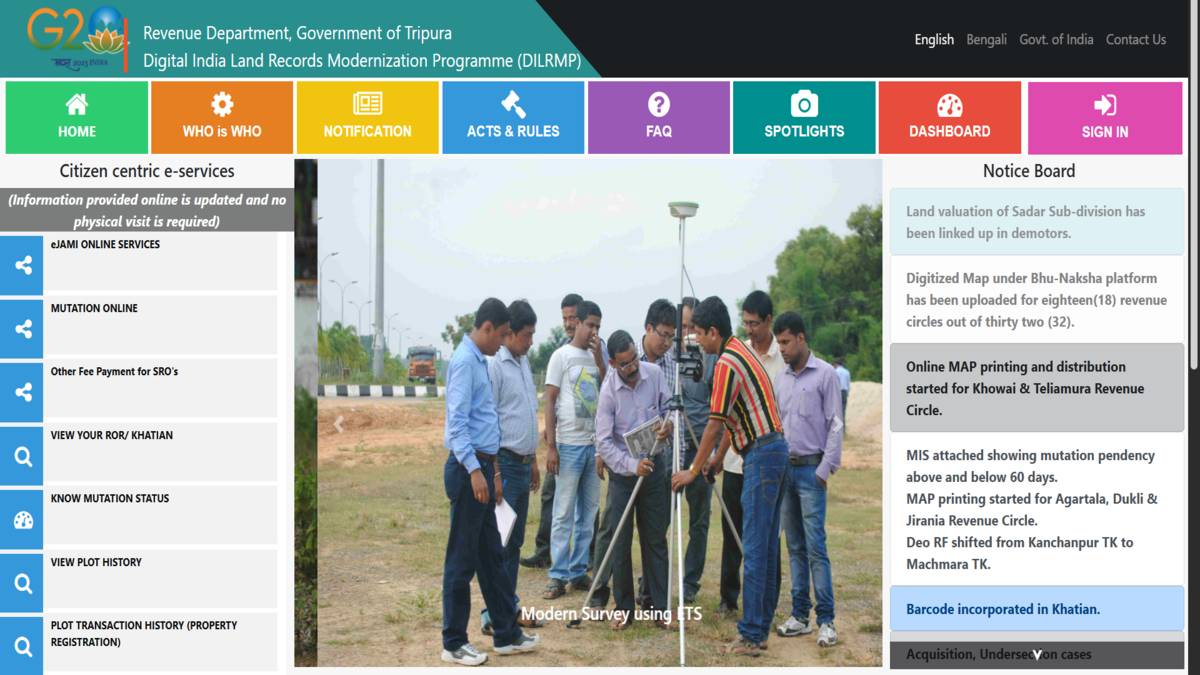
Through the eJami Tripura portal, citizens can check Records of Rights (RoR), view Khatian details, access Tripura Jami maps, track mutation status, verify deed status and browse plot history.
Quick Answer: Jami Tripura (eJami Tripura) is Tripura’s official online land records portal. Citizens can check Khatian (RoR), mutation status, land maps, deed status and plot history – free of cost.
- Jami Tripura Land Records Overview
- Land Measurement Units Considered in Tripura
- 1. Khatian
- 2. Khasra
- What are the E Jami Tripura Citizen-Centric Services?
- Steps To View Jami Khatian Number On EJami Tripura Portal
- Steps to View Mutation Status on Jami Tripura Portal
- 2026 Update: TORS Auto-Triggered Mutation
- Who handles mutation disputes in Tripura?
- How to View a Land Map On The Jami Tripura Website?
- How to Calculate Stamp Fee and Registration Fee in Jami Tripura?
- What is the Purpose of Land Records?
- What are The Various Kinds of Land Records in India?
- How to Navigating the Administrative Hierarchy in Jami Tripura
- How to view Plot History in Jami Tripura Portal?
- How to know the status of Your Deed?
- How to See the Tehsil List in Jami Tripura Portal?
- How to see the Mouja List in Jami Tripura Portal?
- Explore Land Records in Other States
Jami Tripura Land Records Overview
Tripura sits in India’s far northeast, sharing borders with Bangladesh on three sides, Mizoram to the east and Assam to the northeast. It is one of India’s smallest states – hilly, remote and home to a significant tribal population. The state capital, Agartala, lies close to the Bangladesh border.
Land administration here was never simple. Tribal land rights, colonial-era records and limited infrastructure have long made property disputes common and title verification difficult. The eJami Land Records Management System (LRMS) has transformed this process through a web-based, single-window platform that allows citizens to verify land titles independently, accurately and without relying on a revenue officer.
Two Legal Safeguards Built Into eJami Tripura
The eJami system is not just a database. It is built on two legal principles that actively protect property buyers:
- Mirror Principle: The digital record reflects the actual, physical reality of the land. What you see on the portal matches what exists on the ground.
- Curtain Principle: The eJami record is the one and only source of truth. Buyers don’t have to dig through decades of ownership history – the record settles it.
Data Integrity: Maker-Checker-Approver Workflow
Every change on the portal goes through three separate officials. One initiates the entry. A second verifies it. A third approves it. This Maker-Checker-Approver system makes tampering nearly impossible – and keeps every record accountable.
Key Statistics: Jami Tripura 2026
|
Metric |
Detail |
|
Portal URL |
jami.tripura.gov.in |
|
Programme |
DILRMP (formerly NLRMP) |
|
RoR Computerization |
99%+ (as of 2026) |
|
Language Support |
Bengali and English |
|
Total Districts in Tripura |
8 |
|
Total Subdivisions |
23 |
|
Revenue Circles |
5 |
|
Total Tehsils |
39 |
|
Total Moujas |
112 |
|
Mobile App |
Available (Android & iOS) |
Land Measurement Units Considered in Tripura
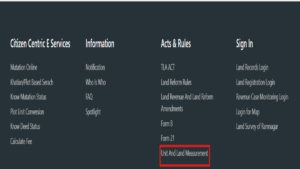
Tripura doesn’t use the same land units as most other Indian states. It has its own system – traditional, local and deeply rooted in how land has been measured here for generations.
The good news? The eJami Tripura portal has a built-in Plot Unit Conversion tool that converts these local units into internationally recognised measurements like acres and square metres. You’ll find it at the bottom of the homepage.
Traditional Tripura Land Measurement Units:
|
Unit |
Description |
|
Dhur |
Used for small residential and agricultural plots |
|
Kranta |
A local sub-unit used in inheritance partitioning |
|
Kara |
Used for defining precise boundary demarcations |
|
Ganda |
A traditional area unit in legacy revenue records |
|
Krani |
A local unit found in historical Tripura land records |
To convert: go to jami.tripura.gov.in – scroll to the bottom – click “Plot Unit Conversion” – fill in the details.
1. Khatian
A Khatian is a land record certificate – called a Record of Rights (RoR). It is the main document used to prove land ownership in Tripura.
Every Khatian entry on the eJami portal includes:
- Unique Khatian number
- Plot (Dag) numbers
- Total land acreage
- Mouza/location details
- Owner’s name and ownership shares
- Description of rights and superior interests
2. Khasra
A Khasra – also called a Field Index – is generated in Form 8. It lists all land parcels within a village by their identification numbers. Think of it as the village-level index for land plots, used for revenue and survey purposes.
Features & Benefits of Ejami Tripura Portal
Before eJami, verifying land ownership in Tripura meant traveling to government offices, waiting in queues and hoping the records were up to date. Now, the same task takes minutes.
The eJami Tripura portal does more than store records. It lets you cross-check the information a property seller gives you against official government data – instantly. If anything doesn’t match, you’ll know before you sign anything.
Key Benefits at a Glance:
|
Feature |
Detail |
|
Availability |
24/7 access from any device, anywhere |
|
Cost |
Most services are completely free |
|
Language |
Bengali and English |
|
Fee Payments |
Stamp duty and registration fees payable online |
|
Property Value |
Market value insights available for sellers |
|
Land Passbook |
Issued on request with complete land information |
|
Credit Linkage |
Credit facilities linked digitally via the portal |
|
Certificate |
Land data certificates downloadable within minutes |
|
Government Schemes |
Check eligibility for state and central programmes |
|
Mobile App |
Available for Android and iOS smartphones |
It’s a fraud-prevention tool as much as it is a land record portal.
What are the E Jami Tripura Citizen-Centric Services?
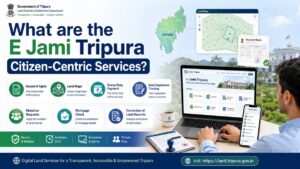
The eJami Tripura portal covers a wide range of services – most of which don’t even require you to create an account. You can check mutation status, view land maps, browse plot history and look up deed status without logging in.
Some services do require registration. Accessing your full RoR/Khatian, submitting a mutation application or paying fees will need a login. Just use your personal credentials on the portal.
Services Available on eJami Tripura Portal
|
Service |
Registration Required? |
|
View Khatian / RoR |
Yes |
|
Check Mutation Status |
No |
|
View Jami Tripura Map / Bhunaksha |
No |
|
View Plot History |
No |
|
Check Deed Status |
No |
|
View Tehsil List |
No |
|
View Mouja List |
No |
|
Pay Registration/Stamp Fee |
Yes |
|
Apply for Mutation |
Yes |
|
Check Mortgage Status |
No |
|
Plot Unit Conversion |
No |
|
Apply for Land Valuation Certificate |
Yes |
|
Apply for Income/Permanent Resident Certificate |
Yes |
|
Request Correction in Khatian/Mutation |
Yes |
Here’s the full list of what the portal offers:
- Jami Tripura Khatian: Check your Record of Rights (RoR) online.
- Registration Fee Payment: Pay stamp duty and registration fees easily, without any hassle.
- Plot History: View the complete ownership and transaction history of any plot.
- Jami Tripura Maps: View and download land maps through Bhunaksha-integrated software.
- Plot Unit Conversion: Convert Tripura’s traditional units into standard international measurements.
- Deed Status: Track the registration status of any property deed online.
- Tehsil & Mouja Lists: Explore administrative area details across Tripura.
- Mutation Application: Submit and track mutation requests without visiting an office.
- Mortgage Status: Check if a mortgage exists on any listed property.
- Correction Services: Correct errors in Khatian entries, mutation records or land data.
Steps To View Jami Khatian Number On EJami Tripura Portal
The Khatian, your Record of Rights – is the most important document on the eJami portal. Here’s exactly how to access it:
Step 1: Open the official portal – jami.tripura.gov.in/site/index_eng.htm
Step 2: On the left-hand side of the homepage, click “VIEW YOUR ROR/KHATIAN”.
Step 3: You’ll be taken to a search page. Enter these details:
- Select District
- Select Sub-Division
- Choose Revenue Circle
- Select Tehsil
- Choose Village / Mouja
- Enter your Khatian Number or Plot (Dag) Number
Step 4: Click “Display” or “Search” to pull up your Khatian.
Step 5: Download or print the document for your records.
Alternative Search Options: Don’t have your Khatian number? You can also search using your Khewat number, Khasra number or Khatauni number – all supported on the RoR search page.
Note: A registered login is required to view the complete RoR document.
Steps to View Mutation Status on Jami Tripura Portal
What is Land Mutation?
Mutation is the process of updating land ownership records in the government’s revenue register – after a sale, transfer, gift or inheritance. Until mutation is done, the new owner’s name won’t appear in the official records. That matters enormously for tax liability, legal proof and future resale.
Online Steps to Check Mutation Status
Step 1: Go to jami.tripura.gov.in/site/index_eng.htm
Step 2: On the left side of the homepage, click “Know Mutation Status”.
Step 3: Enter the following details:
- Select District
- Select Sub-Division
- Choose Revenue Circle
- Select Tehsil
- Choose Mouja
- Enter your MR Number (Mutation Registration Number)
Step 4: Hit “Search”. Your mutation status appears on screen.
2026 Update: TORS Auto-Triggered Mutation
Here’s something that wasn’t possible a few years ago. The Tripura Online Registration System (TORS) is now integrated with eJami. When a sale deed is registered at a Sub-Registrar’s Office through TORS, it can automatically trigger the mutation process. Less paperwork. Fewer trips. Faster results.
Offline Process to Check Mutation Status
Can’t access the portal? The offline process still works:
- Visit the appropriate Sub-Registrar’s Office and collect the selling deed.
- Fill out the mutation application form.
- Submit the completed form to the Registrar’s Office.
- The village accountant will verify and process the report.
- Once approved, contact the concerned Registrar to confirm your mutation status.
Importance of Land Mutation
Skipping mutation after a property transfer isn’t just an administrative oversight – it creates real legal and financial risk. Here’s what’s at stake:
- The new owner’s name gets recorded in the mutation register, which feeds directly into the state government’s income records.
- A mutation report is legally required to determine property tax liability.
- It’s the document that proves legal possession of the land.
- Sellers must present mutation documents to buyers before any transaction is complete.
Who handles mutation disputes in Tripura?
The Revenue Inspector has authority over mutation within their jurisdiction. If there’s a dispute, it goes to the Revenue Inspector, Deputy Commissioner and Assistant Survey Officer – jointly – under the Tripura Land Revenue and Land Reforms Rules, 1961.
Documents Required for Mutation Application:
- Registered sale deed (scanned copy)
- Identity proof (Aadhaar Card / PAN Card)
- Recent land tax receipt
- Completed mutation application form
Mutation Fee: Approximately INR 25 (state share) – payable online through the portal.
How to View a Land Map On The Jami Tripura Website?
The eJami Tripura portal links directly with Bhunaksha software to show you visual cadastral maps – boundary layouts, plot shapes and neighbouring parcels all in one view.
Step 1: Go to jami.tripura.gov.in/site/index_eng.htm
Step 2: On the left side of the page, click “View Your Map”.
Step 3: Enter the search details:
- Select District
- Select Sub-Division
- Choose Revenue Circle
- Select Tehsil
- Choose Village / Mouja
- Enter Plot (Dag) Number
Step 4: Click “View Map”. The map loads on screen.
Step 5: Download it as a PDF – completely free.
Note: These are non-scaled reference maps. They’re useful for personal verification and boundary checks. They are not valid for legal disputes or construction permits.
How to Calculate Stamp Fee and Registration Fee in Jami Tripura?
Online Fee Calculator
Rather than guessing the fees, use the official calculator:
Step 1: Visit registration.tripura.gov.in/egras/calculate_fee.aspx
Step 2: Select your transaction type.
Step 3: Choose the Major Deed Type and Minor Deed Type, then click “Continue”.
Step 4: Enter your land details – District, Subdivision, Revenue Department, etc.
Step 5: Click “View”. The system calculates and displays your fees automatically.
Registration Fee Schedule (Based on Consideration Value)
|
Consideration Value |
Registration Fee |
|
Up to ₹100 |
₹5 |
|
₹101 – ₹250 |
₹7 |
|
₹251 – ₹500 |
₹12 |
|
₹501 – ₹1,000 |
₹18 |
|
Every additional ₹1,000 or part thereof |
₹15 |
For Mortgage (Government Servant Possession-Less Mortgage):
|
Document Type |
Stamp Fee |
Registration Fee |
|
Will Registration |
Nil |
₹30 |
|
Authority (Will) |
₹50 |
₹30 |
|
Cancellation of Will |
₹30 |
₹30 |
|
Codicil |
₹30 |
₹30 |
For Power of Attorney:
|
Type |
Stamp Fee |
Registration Fee |
|
Special Power of Attorney |
₹15 |
₹15 |
|
General Power of Attorney |
₹50 |
₹45 |
|
Special Power of Attorney (5+ attorneys) |
₹100 |
₹45 |
|
Power of Attorney Cancellation |
₹30 |
₹15 |
|
Attorney (General) |
₹10 |
₹15 |
|
General Authenticated Power of Attorney |
₹50 |
₹12 |
|
General Authenticated PoA (5+ persons) |
₹100 |
₹12 |
|
Special PoA (5+ persons, authenticated) |
₹100 |
₹12 |
Except for Immovable Property:
|
Document Type |
Stamp Fee |
Registration Fee |
|
Kabinnama |
Nil |
Computed on transaction amount |
|
Settlement in favour of family member |
6% of market value |
As applicable |
|
Marriage Settlement (Kabinnama at Majlish) |
Nil |
As applicable |
|
Marriage Settlement (Kabinnama) |
6% of consideration value |
As applicable |
|
Other Settlements |
5% of market value |
As applicable |
|
Revocation |
₹30 |
As applicable |
What is the Purpose of Land Records?
Land records are legal proof that you own a piece of immovable property. Without them, transactions stall, loans get rejected and disputes become expensive.
They’re used for:
- Verifying the seller’s identity and confirming the land title is clean.
- Securing a bank loan against agricultural or residential land.
- Supporting your case in a civil property dispute.
- Completing property registration at the Sub-Registrar’s Office.
- Checking eligibility for government welfare and subsidy programmes.
- Establishing rightful ownership during inheritance proceedings.
What are The Various Kinds of Land Records in India?
Land records don’t just document ownership. They also capture geological data – the shape, size, soil type and usage category of a land parcel. In India, these records fall under two title types: primary titles (the most legally significant) and subsidiary titles.
1. Agriculture Land Records
These records document ownership, land use, soil classification and farming activity. They’re essential for farm loans, Kisan credit cards and agricultural subsidy schemes.
2. Industrial Land Records
Industrial land records cover large plots – typically on city outskirts – used for factories, processing units or commercial warehousing. Size matters here and so does zoning classification.
3. Residential Land Records
These cover parcels subdivided for individual dwellings. They apply to independent homes, gated communities and plotted developments alike.
4. Commercial Land Records
Commercial records apply to land used for shops, offices, showrooms and retail outlets – usually in high-footfall, mixed-use zones close to residential neighbourhoods.
How to Navigating the Administrative Hierarchy in Jami Tripura
Every time you search for land records on the eJami portal, you’ll be asked to narrow down your location step by step. Getting this right is important – a wrong selection will pull up empty or incorrect results.
Here’s how Tripura’s land administration is structured, from the top level down:
- District: The highest division. Tripura has 8 – Dhalai, Gomati, Khowai, North Tripura, Sepahijala, South Tripura, Unakoti and West Tripura.
- Sub-Division: Each district is split into sub-divisions. Tripura has 23 in total.
- Revenue Circle: There are 5 revenue circles – designated units built specifically for revenue administration and oversight.
- Tehsil: 39 Tehsils across Tripura. This is the local office that maintains village-level land records.
- Mouja / Mouza: The smallest administrative village unit. Tripura has 112 Moujas – the base level for cadastral mapping.
- Dag / Plot Number: The most specific identifier. Each Dag number represents one unique parcel of land.
Select these in order, every time. It’s the map that leads you to the right record.
How to view Plot History in Jami Tripura Portal?
Before you buy, check the history. Plot history shows you every ownership change, transfer and transaction linked to a specific land parcel. It’s your best defence against hidden disputes or undisclosed encumbrances.
- Visit jami.tripura.gov.in
- Under Citizen e-Centric Services, click “View Plot History”.
- Select your location: District – Sub-Division – Revenue Circle – Tehsil – Mouja.
- Enter the Plot (Dag) Number.
- Click “Display” to see the full transaction history.
- Save or download the record for future reference.
How to know the status of Your Deed?
Once a deed is registered, you can track its status directly from the portal – no need to follow up with the registrar’s office manually.
Step 1: Visit jami.tripura.gov.in/NLRMP_home.html
Step 2: Under Citizen e-Centric Services, click “Know Deed Status”.
Step 3: Select your District and Registry Office.
Step 4: Enter the captcha code and click “Continue” to view your deed status.
How to See the Tehsil List in Jami Tripura Portal?
Need to find the right Tehsil for your search? The portal lets you browse the full list by area.
Step 1: Go to jami.tripura.gov.in/site/index_eng.htm
Step 2: On the left-hand side, click “Tehsil List”.
Step 3: Enter the following:
- Select District
- Select Sub-Division
- Select Revenue Circle
- Enter Code
Step 4: Click “Search”. The Tehsil list for your selected area loads below.
How to see the Mouja List in Jami Tripura Portal?
Mouja browsing works the same way – quick and free.
Step 1: Go to jami.tripura.gov.in/site/index_eng.htm
Step 2: On the left-hand side, click “Mouja List”.
Step 3: Enter:
- Select District
- Select Sub-Division
- Select Revenue Circle
- Select Tehsil
- Enter Code
Step 4: Click “Search”. The complete Mouja list for that Tehsil appears instantly.
Explore Land Records in Other States
Tripura isn’t the only state with an online land records portal. Every major state in India now has its own platform. Here’s a quick reference:
| Karnataka | Bhoomi Online RTC |
| Chhattisgarh | CG Bhuiya |
| Uttarakhand | Bhulekh UK |
| Punjab | PLRS |
| Madhya Pradesh | Bhulekh MP |
| West Bengal | Banglarbhumi |
| Odisha | Bhulekh Odisha |
| Bihar | Land Record Bihar |
| Jharkhand | Jharbhoomi |
| Tamilnadu | Patta Chitta |
| Maharashtra | Mahabhulekh |
| Telangana | Dharani |
| Andhra Pradesh | Mee Bhoomi |
| Gujarat | AnyROR |
Frequently Asked Questions:
1. What is Jami Tripura and what is the official portal link?
Jami Tripura (eJami Tripura) is the Government of Tripura’s official online land records portal, accessible at jami.tripura.gov.in. Citizens can view Khatian, mutation status, land maps and plot history through it.
2. How do I check my Khatian number on the eJami Tripura portal?
Visit jami.tripura.gov.in, click “View Your ROR/Khatian,” select your district, sub-division, revenue circle, Tehsil and Mouja, enter your Khatian number and click Display.
3. Is registration required to access land records on Jami Tripura?
Most services – including Mutation Status, Land Maps and Plot History – are free without registration. Accessing the full RoR/Khatian and submitting mutation applications requires an account.
4. What is the mutation fee on the Jami Tripura portal?
The mutation fee is approximately INR 25 (state share), payable online through the eJami Tripura portal.
5. What are the traditional land measurement units used in Tripura?
Tripura uses Dhur, Kranta, Kara, Ganda and Krani. The eJami portal’s Plot Unit Conversion tool converts all of these into standard international units like acres and square metres.
6. How many districts, tehsils and moujas are there in Tripura?
Tripura has 8 districts, 39 Tehsils, 5 Revenue Circles and 112 Moujas – all browsable directly on the eJami Tripura portal.