
Standing in a revenue office queue just to check a land record used to be a normal part of owning property in Andhra Pradesh. You would take a day off work, travel to the tehsildar or village office, wait in line, and often still leave without a clear answer about your own land. That entire experience has been replaced by a single website.
Meebhoomi, which translates to “Your Land” in Telugu, is the Andhra Pradesh government’s official land records portal. It was launched in 2015 by the state’s Revenue Department as part of a larger push to digitise land governance and remove the layers of paperwork, middlemen, and delay that used to surround something as basic as proving what land you own. Today, the portal covers everything from ownership records and crop details to survey maps and Aadhaar-linked verification, and nearly all of it is accessible from a phone.
This matters for more people than just landowners. Farmers use Meebhoomi to prove landholding for government schemes. Buyers use it to verify a seller’s ownership before making a deal. Banks reference Adangal and 1B extracts when processing agricultural loans. And courts accept these same documents as evidence in property disputes. In other words, Meebhoomi has quietly become the backbone of how land is legally recognised in Andhra Pradesh.
- What Is AP Meebhoomi?
- Who Manages Andhra Pradesh Land Records?
- Steps How to Check Andhra Pradesh Land Records Details on MeeBhoomi Portal
- How do I check the 1B ROR documents on the Online Mee Bhoomi Portal?
- Download Electronic Land Certificate and Graduate Passbook from Meebhoomi Portal
- Meebhoomi AP Gov In: Key Services Explained
- Meebhoomi AP Gov In App: Is There an Official App?
- How to Link Aadhaar with Land Records on Meebhoomi
- How to Check Mutation Details on Meebhoomi
- Survey Numbers and Land Records in Andhra Pradesh
- Filing a Complaint on Meebhoomi
- Related Government Schemes Linked to Land Records
- Conclusion
What Is AP Meebhoomi?
Meebhoomi is the online land records portal for Andhra Pradesh, run by the state’s Revenue Department, that lets citizens view and download land ownership documents from home instead of visiting a government office.
The portal was built to solve a very specific, very old problem. Land records in Andhra Pradesh used to exist as physical registers, handwritten and updated by hand, sitting in village and tehsildar offices. If a record was damaged, misplaced, or simply out of date, there was often no easy way to correct it, and getting even a certified copy could take weeks. Meebhoomi digitised these registers and made them searchable by district, mandal, village, survey number, account number, or Aadhaar number, which means the same information that once took a week to retrieve can now be pulled up in under a minute.
On meebhoomi.ap.gov.in, you can check your Adangal or land account record, view your 1B or ROR document, download your electronic passbook, look up your Field Measurement Book sketch, view the village map for your area, link your Aadhaar number to your land, track the status of a mutation after a sale or inheritance, and file or monitor a grievance if something on your record looks wrong. Nearly every service that used to require an in-person visit to the revenue department is now available online, in Telugu, with an English-language experience improving each year.
Who Manages Andhra Pradesh Land Records?
The Survey and Land Records Department, along with the Revenue Department of Andhra Pradesh, is jointly responsible for managing and updating land records in the state, and understanding the split between them saves you a wasted trip.
Two separate government bodies work together behind the scenes of Meebhoomi. The Revenue Department of Andhra Pradesh maintains land ownership records, Adangal, and 1B documents through its network of tehsildar and village revenue offices. This is the department that records who owns a piece of land, what it is used for, whether it carries any liabilities, and how ownership has changed over time through sale or inheritance.
The Director of Survey Settlement and Land Records, Andhra Pradesh, oversees a different but equally important function: land surveys, physical measurement, boundary settlement, and the technical data captured in the Field Measurement Book. This office is responsible for the accuracy of the maps and measurements that Meebhoomi displays, and it periodically resurveys villages to correct historical errors in boundary lines.
Why This Matters for You
If your Adangal shows the wrong owner name or an outdated crop entry, that is a Revenue Department matter, and your village revenue officer or tehsildar is the right point of contact. If your land’s boundary, shape, or survey number looks incorrect on the map, that falls under the Survey Settlement and Land Records office instead. Knowing this distinction before you leave home means you walk into the correct office on the first attempt, rather than being redirected after a long wait.
Steps How to Check Andhra Pradesh Land Records Details on MeeBhoomi Portal
You can check the details of Andhra Pradesh Land Records, or Meebhoomi ROR, on the website through the following procedure:.
Step 1: Go to the official website: meebhoomi.ap.gov.in
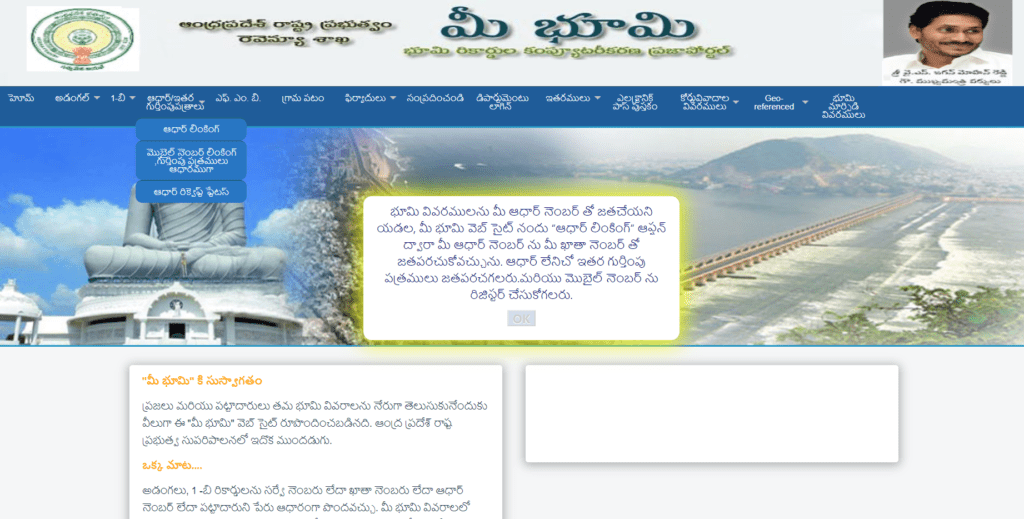
Step 2: On the homepage, click “Adangal” or “1-B” from the menu.
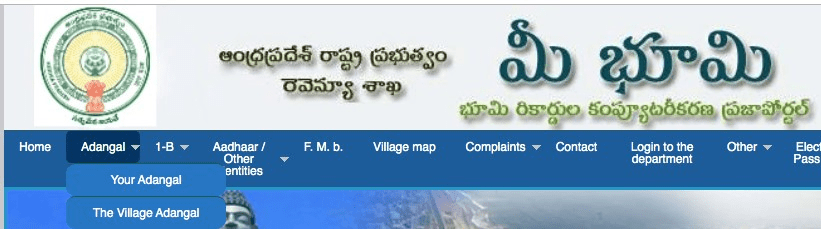
Step 3: Choose whether you want “Your Adangal” (individual) or “Village Adangal”.
Step 4: Select your District, Mandal, and Village from the dropdown menus.
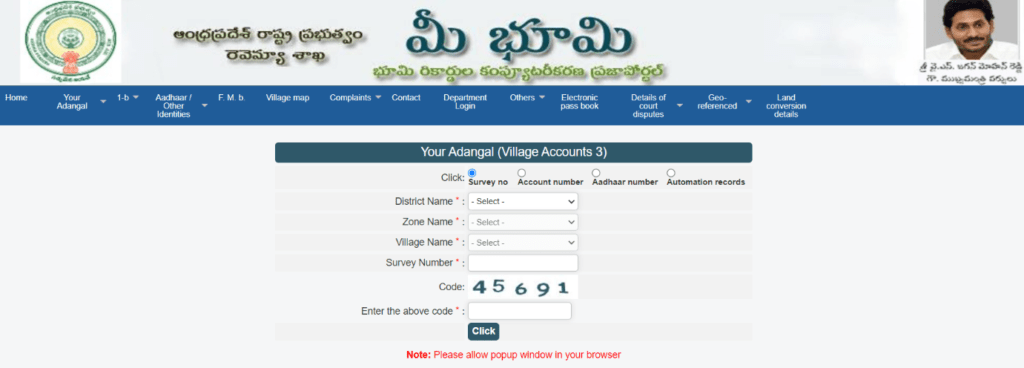
Step 5: Enter your Survey Number, Khata Number, or Aadhaar Number, whichever the field asks for.
Step 6: Type the captcha code shown on screen exactly as displayed.
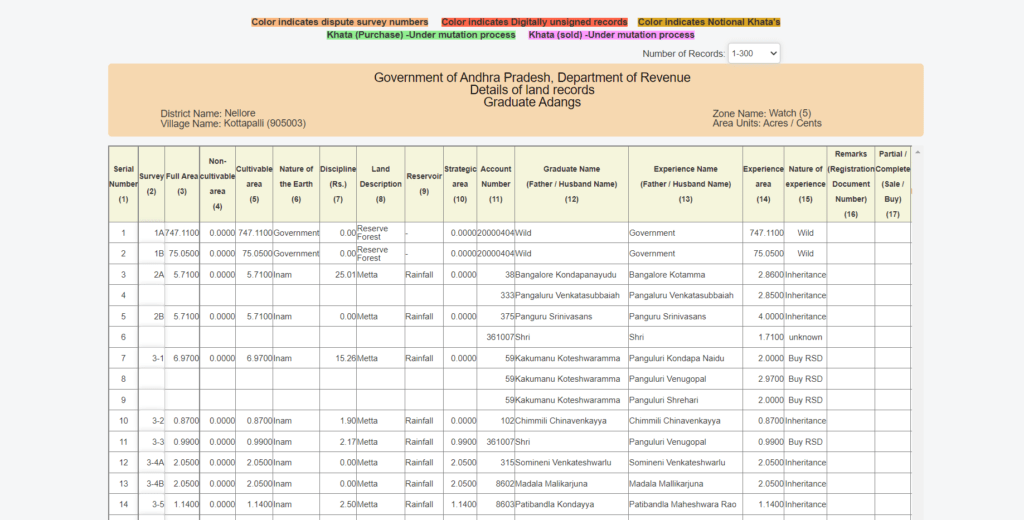
How do I check the 1B ROR documents on the Online Mee Bhoomi Portal?
You can now check the ROR 1B easily through the website portal. Follow the below-mentioned steps to get your ROR.
Step 1: Open the official website of Andhra Pradesh Mee Bhoomi.
Step 2: Select the 1-B option on the top menu of the website. Here, you need to choose whether you want your 1-B or the village’s 1-B.
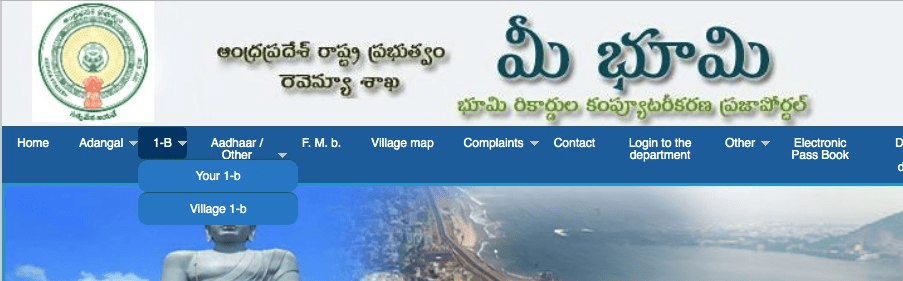
Step 3: If you select the ‘your 1-B’ option, you will be redirected to another page where you will have to enter the district, zone, village, account number, and captcha. You can replace the account number with a survey number, an Aadhaar number, the name of the graduate, and automated records.
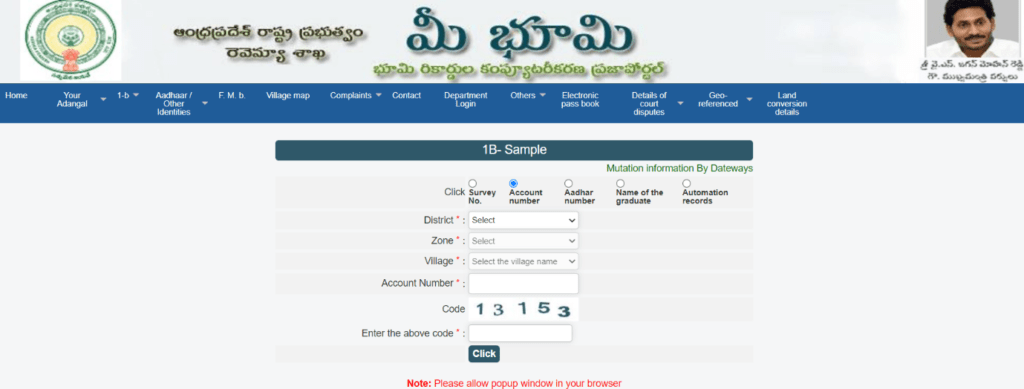
Once you enter the details, select the click button to get your ROR records.
Step 4: If you select the village 1-B option, you will be redirected to another page where you have to fill in the district, zone, village, and captcha details. Then select ‘Generate ROR’ to access the village ROR records.
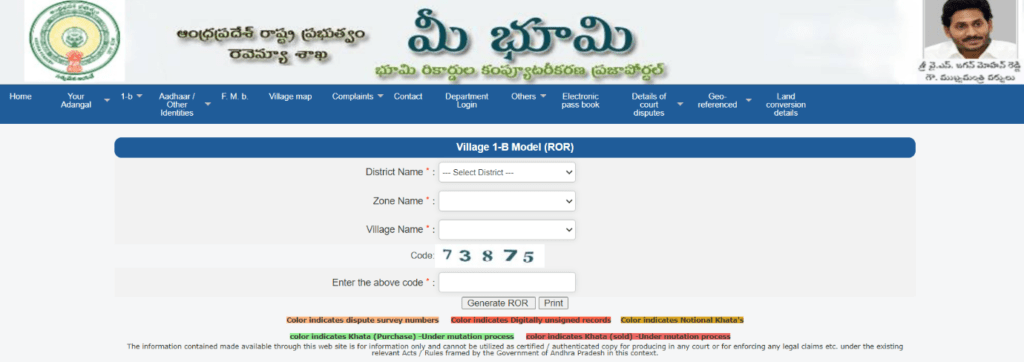
Once you enter the details, select the generate ROR option to acquire the village ROR records.
Download Electronic Land Certificate and Graduate Passbook from Meebhoomi Portal
This is a secure process, and the landowners can trust it. The landowners can easily find their records and download the Electronic Land Certificate, as well as their Passbook from the Mee Bhoomi portal. You can trust this process, as no one else can crash the system and take your details. This is because the process goes through a step where you will get an OTP on your registered mobile number, which you must enter before getting your Electronic Land Certificate or a Passbook for security purposes.
Only when you enter the OTP and verify that you are the authentic owner who wants the Electronic Land Certificate or Passbook, will you obtain the E-Pass Book. There are two options that you can go for, like an account number or an Aadhaar card.
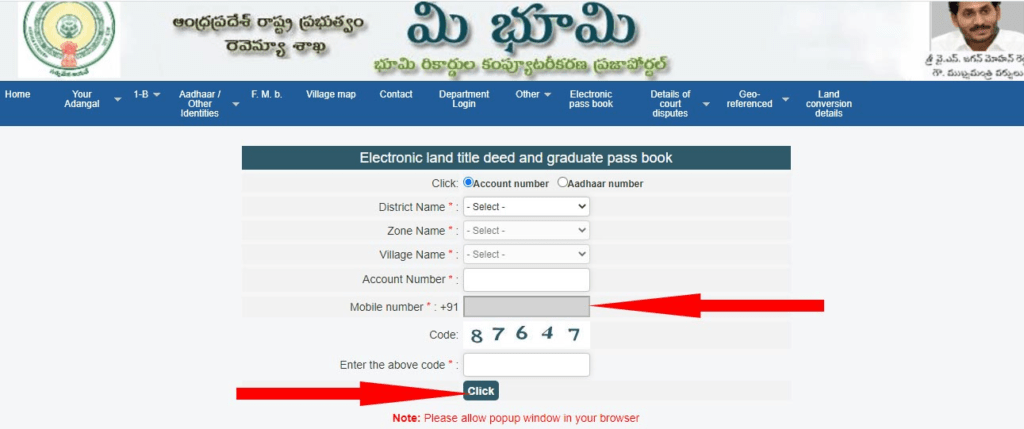
Step 1: First, you will have to choose any one of the two options. You can either choose an Aadhaar card or an account number.
Step 2: After the selection, you will be directed to a page where you will have to further select the name of the district, the name of the zone, and the name of the village.
Step 3: Once you finish the above selections, you have to put in your account number or Aadhaar number in the box where it is specified.
Step 4: It further extracts the registered mobile number from the database automatically.
Step 5: You will then receive an OTP for confirmation from the Mee Bhoomi website for verification to see if you are the rightful person to gain access to the information or documents.
Step 6: Once you are done with the above steps, you will have to enter the captcha code to solve it for security purposes, and then click on SUBMIT.
Step 7: If all the information furnished by you is correct, you will now be able to easily download the electronic land certificate and the electronic passbook according to your needs.
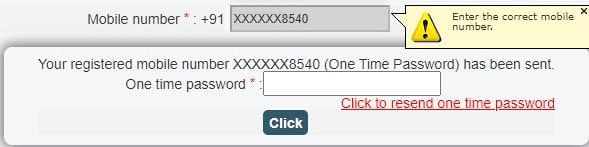
Since this is a secure process, it is safe to trust this procedure to gain access to the Electronic Land Certificate and the E-Passbook too. People need not run around to various government offices and wait for longer days for the records to reach their hands now. They can just log in online and find all the information they need at their fingertips instantly.
| Karnataka | Bhoomi Online RTC |
| Chhattisgarh | CG Bhuiya |
| Uttarakhand | Bhulekh UK |
| Punjab | PLRS |
| Madhya Pradesh | Bhulekh MP |
| West Bengal | Banglarbhumi |
| Odisha | Bhulekh Odisha |
| Bihar | Land Record Bihar |
| Jharkhand | Jharbhoomi |
| Tamilnadu | Patta Chitta |
| Maharashtra | Mahabhulekh |
| Telangana | Dharani |
| Gujarat | AnyROR |
Meebhoomi AP Gov In: Key Services Explained
Meebhoomi is really a collection of smaller services bundled under one portal, and each one answers a slightly different question about a piece of land. Understanding what each document actually tells you helps you request the right one the first time, instead of downloading three records before finding the one you needed.
What Is Adangal?
Adangal is a village-level land record that shows ownership, land type, soil quality, crops grown, and tenancy details. It is also called Pahani or Village Account Number 3, and it is maintained by the village administrative authority.
Because Adangal captures so much operational detail about a plot, from the soil variety to any outstanding liabilities, it is one of the most frequently requested documents in property transactions. Banks accept it when assessing agricultural loans, courts reference it during ownership disputes, and buyers use it to confirm what a seller has actually claimed about the land before finalising a purchase.
What Is 1B / ROR?
The 1B, also called ROR or Record of Rights, is an official extract of land ownership maintained by the Revenue Department through the tahsildar’s office. It is used for bank loans, property verification, and legal proceedings, and it specifically confirms whether the land is currently mortgaged.
Before Meebhoomi digitised these records, each village’s 1B existed only in a paper register kept at the local office, and a certified copy had to be requested and collected in person. Today the same document can be generated online in a couple of minutes, using the same account or survey number you would use for an Adangal search.
Adangal vs 1B: What’s the Difference?
The two documents are often confused because they cover overlapping ground, but they serve distinctly different purposes. The table below breaks down exactly what separates them.
|
Adangal |
1B / ROR |
|
Shows land type, soil, crops, tenancy |
Shows ownership and mortgage status |
|
Maintained by village administration |
Maintained by the tahsildar |
|
Used for general land information |
Used for bank loans and legal ownership proof |
In practice, most transactions require both documents rather than just one. The 1B confirms who legally owns the land and whether it is mortgaged, while the Adangal fills in the operational picture: what is grown there, what condition the soil is in, and whether any tenancy arrangement exists. A buyer who checks only one of the two is working with half the picture.
What Is FMB (Field Measurement Book)?
FMB is a hand-drawn survey map that records the exact size, shape, and boundary of a land parcel. It is maintained by the Survey and Land Records Department and stored at the concerned tehsildar office.
FMB sketches are built from several technical components, including the F-line, which marks the actual field boundary, the G-line, an arbitrary reference line used to adjust and calculate the sketch, and subdivision lines, which separate smaller parcels within a single survey number. These details rarely matter to a casual reader, but they matter enormously in a boundary dispute, where a few centimetres on paper can determine which side of a fence a wall legally belongs on. You can request an FMB sketch online through Meebhoomi by entering your survey number, and a written request to the tehsildar office is still required for a certified physical copy.
How to View the Meebhoomi Passbook
- Visit meebhoomi.ap.gov.in
- Click “Electronic Passbook” from the top menu bar
- Enter district, mandal, village, account number, and mobile number
- Submit the captcha to view or download your passbook
The electronic passbook is the digital equivalent of the pattadar passbook that landowners used to carry physically, and it is now considered valid for most official purposes, including bank verification.
How to View the Village Map on Meebhoomi
- Select “Village Map” from the homepage menu
- Choose district, mandal, and village
- Enter the code shown and click submit
- Your village map will load directly on screen
Village maps are especially useful when you are trying to understand a plot’s position relative to neighbouring fields, roads, or water bodies, something a text-based Adangal record cannot show you.
Meebhoomi AP Gov In App: Is There an Official App?
As of now, there is no single official government-verified Meebhoomi app on the Play Store; the portal is primarily, and most reliably, accessed through the meebhoomi.ap.gov.in website.
Several apps carrying names like “Mee Bhoomi” or “AP Meebhoomi” do exist on the Play Store, but these are built and maintained by private developers rather than the Andhra Pradesh government. Some are reasonably accurate mirrors of the website’s data, while others are outdated or ad-heavy. Before entering your Aadhaar number, account number, or any other personal detail into one of these apps, it is worth checking who publishes it and reading recent reviews, since a data-safety mistake here can be harder to undo than simply visiting the website directly. For guaranteed accuracy and safety, the official website, meebhoomi.ap.gov.in, remains the recommended way to access every service described in this guide.
How to Link Aadhaar with Land Records on Meebhoomi
To link Aadhaar with your land record on Meebhoomi, go to the “Aadhaar/Other Identities” section, enter your district, village, and account number, then submit to complete the linking.
- Visit meebhoomi.ap.gov.in
- Click “Aadhaar/Other Identities” and then select “Aadhaar Linking”
- Enter district, mandal, village, and account number
- Enter the captcha code shown on screen
- Click Submit: your Aadhaar will be linked to the land record
Linking Aadhaar to land records was made a government priority to reduce fraud and improve the accuracy of ownership data across India, and Andhra Pradesh has actively pushed pattadars to complete this step. Once linked, your land record becomes tied to a unique identity number that cannot be duplicated, which makes it significantly harder for someone else to fraudulently claim or resell your land. It also speeds up processes like bank loan approval and crop insurance claims, since your identity and land ownership can be cross-verified automatically instead of manually.
How to Check Aadhaar Linking Status
- Go to the Meebhoomi homepage
- Select “Aadhaar/Other Identities” and then “Status”
- Choose your district and enter your reference or complaint number
- Click Submit to view the current linking status
How to Check Mutation Details on Meebhoomi
Mutation is the formal process of updating land ownership records after a sale, inheritance, gift, or partition. It is a critical step that many buyers overlook: paying for land and getting a sale deed registered does not automatically update the Adangal or 1B record in your name, mutation is the separate step that does.
- Visit the Meebhoomi portal
- Click “1-B” and then “Your 1-B”
- Select “Mutation Information by Datagaum”
- Enter district, area, village, and the relevant date of mutation
- Click Submit to view the mutation status on screen
Typical timeline: mutation in Andhra Pradesh usually takes around 30 days to complete from the date of application, after which the title deed cum passbook is issued in the new owner’s name. If your mutation is taking noticeably longer than this, it is worth following up directly with your village revenue officer rather than assuming the delay is normal.
Survey Numbers and Land Records in Andhra Pradesh
A survey number is a unique identifier assigned to a specific plot of land, used to track ownership, boundaries, and revenue records across every service on the Meebhoomi portal.
Every major document on Meebhoomi, whether it is the Adangal, the 1B, or the FMB, can be searched using this single survey number, along with alternatives like the Khata number or Aadhaar number depending on which service you are using. If you do not know your survey number, it is usually printed on any past sale deed, tax receipt, or passbook you may already hold. Failing that, your village revenue officer can look it up using your name and village, or you can search the Adangal record by owner name to locate it.
Filing a Complaint on Meebhoomi
If a record shows incorrect ownership, a missing update, or any other discrepancy, Meebhoomi lets you file a grievance directly rather than relying entirely on an in-person visit.
- Visit the official portal
- Click “Complaint” and then “Record a Complaint”
- Fill in your name, mobile number, Aadhaar number, address, and the type of complaint
- Add your district, village, and mandal details
- Submit the form to receive a complaint reference number you can use to track progress
Keep your reference number safe after filing, since it is the only way to check on the status of your complaint later without having to refile the same details.
Related Government Schemes Linked to Land Records
Land records in Andhra Pradesh do more than establish ownership; they also determine eligibility for several central and state government welfare schemes aimed at farmers and landholders.
PM Kisan Samman Nidhi: small and marginal farmers with landholding records get Rs 6,000 per year, paid in three equal instalments of Rs 2,000 every four months, directly into their bank account. Land ownership proof, most commonly verified through Adangal-type records, forms a core part of the eligibility check, which is one more reason keeping your Meebhoomi records accurate and up to date matters even if you have no immediate plan to sell or transfer your land.
Conclusion
Meebhoomi has done more than digitise paperwork; it has changed the basic experience of dealing with land in Andhra Pradesh. What once meant travelling to a tehsildar office, waiting in line, and hoping the clerk on duty could locate the right register now takes a few minutes from a phone or laptop, at any hour, without a single office visit. Whether you need to check an Adangal before signing a sale agreement, download a 1B for a bank loan, verify an FMB boundary before building a wall, or simply confirm that your Aadhaar is correctly linked to your land, the portal puts all of it in one place.
That said, the system is not entirely without gaps. There is currently no verified official mobile app, mutation still takes around a month to reflect, and the distinction between the Revenue Department and the Survey and Land Records Department can confuse first-time users trying to resolve an error. Being aware of these limits, and knowing exactly which office handles which kind of correction, will save you time the one time you actually need to walk into an office rather than log in from home. As Andhra Pradesh continues expanding digital land governance through 2026 and beyond, Meebhoomi is likely to remain the single most important resource for anyone who owns, farms, buys, or sells land in the state.
Frequently Asked Questions:
1. What is Meebhoomi AP?
Meebhoomi is Andhra Pradesh’s official online land records portal, run by the state Revenue Department, where landowners, farmers, and buyers can check Adangal, 1B, FMB, village maps, and other land documents without visiting a government office. It was launched in 2015 and remains the primary digital record of land ownership in the state.
2. How do I check my land record on meebhoomi.ap.gov.in?
Visit meebhoomi.ap.gov.in and select either the Adangal or 1-B option from the homepage menu. Choose your district, mandal, and village, then enter your survey number, Khata number, or Aadhaar number along with the captcha code. Submitting this form displays your land record on screen, which you can then view, download, or print for free.
3. Is there an official Meebhoomi AP gov in app?
No government-verified official app currently exists on the Play Store. The apps listed under names like Mee Bhoomi or AP Meebhoomi are built by private developers, not the Andhra Pradesh government, so it is safer and more reliable to use the official website, meebhoomi.ap.gov.in, directly rather than entering personal details into a third-party app.
4. What is the difference between Adangal and 1B?
Adangal shows details like land type, soil quality, crops grown, and tenancy status, and is maintained by the village administration. The 1B, also called the Record of Rights, is maintained by the tahsildar and confirms legal ownership along with whether the land is mortgaged. Most transactions and loan applications require both documents together.
5. Who manages land records in Andhra Pradesh?
Two departments manage land records jointly. The Revenue Department of Andhra Pradesh maintains ownership records, Adangal, and 1B documents through village and tehsildar offices, while the Survey and Land Records Department, headed by the Director of Survey Settlement and Land Records, handles surveys, boundary settlement, and Field Measurement Book data.
6. How do I link Aadhaar with my land record?
Go to the “Aadhaar/Other Identities” section on the Meebhoomi portal and select Aadhaar Linking. Enter your district, mandal, village, and account number, complete the captcha, and submit the form. Once processed, your Aadhaar number is linked to your land record, reducing the risk of duplicate ownership claims or fraudulent resale.
7. How long does mutation take in Andhra Pradesh?
Mutation, the process of updating ownership records after a sale, inheritance, or transfer, typically takes around 30 days from the date of application. Once complete, the title deed cum passbook is issued in the new owner’s name. If the process takes noticeably longer, it is worth following up with your village revenue officer directly.
8. Can I download my Meebhoomi passbook online?
Yes. Visit the Electronic Passbook section on the Meebhoomi portal, enter your district, mandal, village, account number, and registered mobile number, then submit the captcha. Your electronic passbook, the digital equivalent of the physical pattadar passbook, will be available to view, download, and print immediately.
9. What is a survey number used for?
A survey number is a unique identifier assigned to a specific plot of land, and it is the primary reference used to search Adangal, 1B, and FMB records on Meebhoomi. If you do not know yours, it is usually printed on any past sale deed, tax receipt, or passbook, or your village revenue officer can help you locate it.
10. Is checking land records on Meebhoomi free?
Yes, viewing and downloading standard records such as Adangal, 1B, FMB sketches, and village maps on Meebhoomi is free of charge. There is no login fee or subscription required; you only need the relevant district, village, and identifying number, such as a survey or account number, to pull up a record.