Most UP government employees opened Manav Sampada only when they had to. That changed in early February 2026, when news reports said the January salary of more than 68,000 employees had been held back. The reason was simple: they hadn’t uploaded their property details on the portal. Google’s keyword data shows searches for Manav Sampada UP peaking at around 15 lakh in December 2025, just before that deadline.
Behind the headlines sits an ordinary HR tool. The About eHRMS page calls it a common application for tracking postings, promotions, transfers and service history. NIC’s UP State Centre in Lucknow builds and hosts it at ehrms.upsdc.gov.in, and the portal says it aims to serve about 20 lakh employees.
This guide covers the Manav Sampada UP login and what to do when it fails. After that come leave, pay slips, the e-service book and the property return rule that caught so many people off guard. Most readers have five minutes and one task, so we’ve kept it short.
- How to Log In to Manav Sampada UP: The Short Version
- What Is Manav Sampada UP?
- Is ehrms.upsdc.gov.in the Real Manav Sampada UP Portal?
- How to Log In to Manav Sampada UP (Step by Step)
- Manav Sampada UP Login Not Working? Try These Fixes
- Manav Sampada Login for Teachers and Other Departments
- How to Apply for Leave on Manav Sampada UP
- How to Download Your Pay Slip from Manav Sampada UP
- Manav Sampada UP E-Service Book: What It Holds and What to Check
- Property Return on Manav Sampada UP: Deadlines and Salary Holds
- Other Useful Links on the Manav Sampada Portal
- Manav Sampada UP Helpline and Support: Who to Contact
- Wrapping Up: Manav Sampada UP Without the Stress
How to Log In to Manav Sampada UP: The Short Version
Open the official portal, click eHRMS Login and fill in four things: your department, User Id, password and the captcha. That’s the whole login.
- Open ehrms.upsdc.gov.in in your browser.
- Click eHRMS Login at the top right of the blue menu bar.
- Select your department from the list.
- Type your User Id and password and the captcha text.
- Click Login. If you have forgotten the password then click Forgot Password instead.
We checked the home, login, About eHRMS and Contact Us pages on 3 November 2026.
What Is Manav Sampada UP?
Manav Sampada UP is the Uttar Pradesh government’s online HR portal for its employees. On ehrms.upsdc.gov.in, staff log in to apply for leave, open their e-service book, download pay slips and file their property return. NIC’s UP State Centre in Lucknow builds and hosts it.
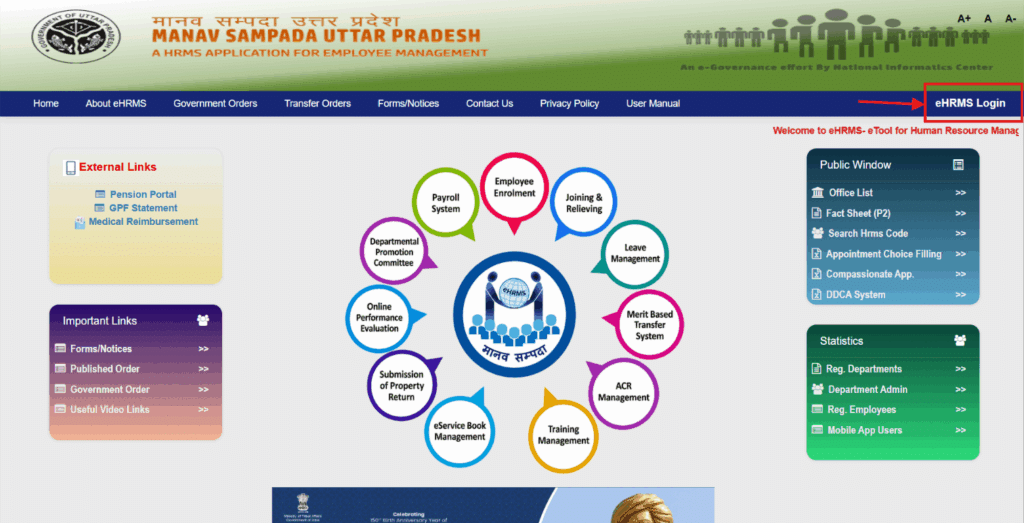
A few useful links are on the right side of the home page: the Fact Sheet (P2), Search Hrms Code and the list of registered departments. Government Orders, Transfer Orders and Forms or Notices are in the top menu. You can click on any of them before logging in. This site is used by teachers and staff from departments. They are mainly from education, agriculture and cooperative departments.
The idea is simple. The paper service book which was earlier kept in office cupboards is now on a server. That means less paper, less running between offices and one record per employee. The About eHRMS page also names the RTI Act as a reason, for postings and transfers.
The home page shows 11 modules in a circle. They are Employee Enrolment, Joining and Relieving, Leave Management, Merit Based Transfer System, ACR Management, Training Management, eService Book Management, Submission of Property Return, Online Performance Evaluation, Departmental Promotion Committee and Payroll System. Most employees will only touch four: leave, the pay slip, the e-service book and the property return.
Is ehrms.upsdc.gov.in the Real Manav Sampada UP Portal?
Yes. ehrms.upsdc.gov.in is the real portal, and NIC’s UP notification page says Manav Sampada moved to this address. An old bookmark may point somewhere else.
Search for the portal and you’ll meet plenty of look-alike sites. The footer is one check. On the real portal, it says the website is managed by NIC, UP State Centre, Lucknow, as the HRMS tool for state departments. But a footer can be copied. Our habit is simpler. Type the address yourself and never enter your password or an OTP on a page you reached through an ad or a forwarded link.
How to Log In to Manav Sampada UP (Step by Step)
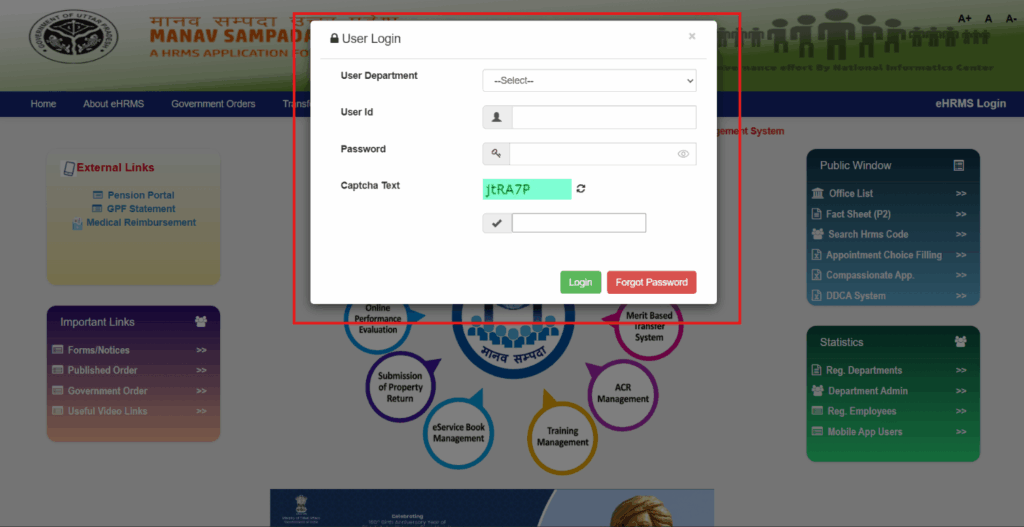
The login form opens as a pop-up on the home page, so there’s no separate login page to hunt for. Here is the full path.
- Type ehrms.upsdc.gov.in in your browser.
- Click eHRMS Login in the top right corner.
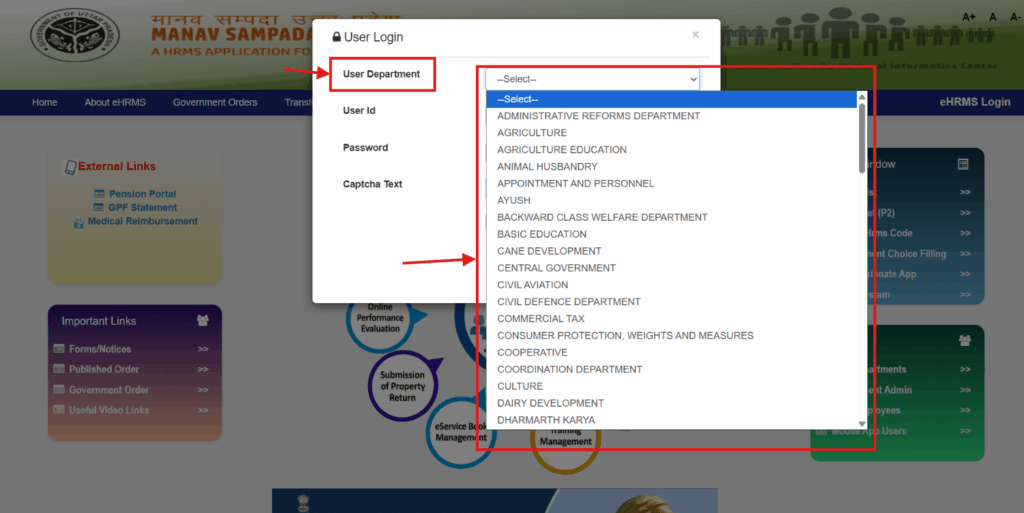
- Open the User Department list and pick your department. The list is alphabetical and long, so take a second here. Basic Education sits near the top, with Commercial Tax and Cooperative a little further down.
- Type in your User ID and password. Click the small eye icon to double-check your typing. Then, look at the security code on the screen, type it into the box below, and click Login.
From where can you get the Manav Sampada user id and password?
Your department does. The About eHRMS page lists an Office Administrator role that registers employees and creates passwords. The Contact Us page sends data work to the Manav Sampada Nodal Officer in your establishment office. The login pop-up has no sign-up form, so new joiners can’t register themselves. Ask your office.
Lost your HRMS code? Look under Public Window on the home page for Search Hrms Code. It sits on the home page, so it’s open before you log in.
Forgot Your Manav Sampada Password?
If you forget your password, click the red button next to Login. Then, just follow the quick steps on the screen to reset it. If that gets you nowhere, go back to your nodal officer, because password creation sits with the office administrator.
Manav Sampada UP Login Not Working? Try These Fixes
Login issues are usually just a small mistake. It is frustrating when you are up against a month-end deadline and the security code keeps failing. Take a breath and check this quick table before you worry.
| Problem | What to try |
| Login says the details are wrong | Check the department first. Then use the eye icon to see your password. |
| Captcha is rejected | Click the refresh icon beside the captcha and type the new text. |
| Page looks broken or won’t load | Try another current browser and clear the cache. |
| You don’t have a User Id yet | Ask your office’s Manav Sampada Nodal Officer. |
| Details in your record are wrong | Take it to the same nodal officer. Data changes go through them. |
| An error you can’t fix | Email NIC’s technical team at ehrms-up@gov.in. |
Anyone offering to fix your login over WhatsApp is a red flag. Keep your password and OTP to yourself, even from helpful colleagues.
Manav Sampada Login for Teachers and Other Departments
Teachers use the same portal. If you teach in a basic school, pick Basic Education from the department list. Staff of other departments do the same with their own. The list runs from Agriculture and Animal Husbandry to Commercial Tax and Cooperative, so scroll until you find yours.
How to Apply for Leave on Manav Sampada UP
Your leave request goes to your reporting officer. The About eHRMS page describes the flow: you apply on the portal, and the officer approves, rejects or cancels it there. The path to the form is short.
- Open ehrms.upsdc.gov.in in your browser.
- Click eHRMS Login and choose your department.
- Type your User Id and password, then the captcha, and log in.
- Wait for your dashboard to open.
- Click the Leave Module option.
- Pick the leave type and the dates. Add the reason, and your address during leave if it applies.
- Upload a document if your type of leave needs one, then submit.
After that, the request waits with your reporting officer. You can follow its status from the Leave section of your dashboard.
Say you need two days of casual leave for a cousin’s wedding. So apply a week ahead, not the night before. Nothing is approved until your officer opens the request.
How to Download Your Pay Slip from Manav Sampada UP
The Payroll System module on the home page is run from your DDO’s office. As an employee, you only need the slip, and getting it takes four steps.
- Log in at ehrms.upsdc.gov.in.
- Click Salary Details or Pay Slip. You’ll see the option after you log in.
- Choose the month and year you want.
- Click Download or Print.
Can’t see your pay slip? Then ask your DDO, the officer who handles salary in your office.
Download your pay slips early if you want a home loan. Banks always ask for your most recent slips. Even one missing month can slow down your application.
Manav Sampada UP E-Service Book: What It Holds and What to Check
Of everything on the portal, the e-service book is the part most employees ignore until something goes wrong. We’d do the opposite. The About eHRMS page spells out what it stores. The third column below is our addition: what we’d check in each part.
| Section | What it holds | What to check |
| Personal Information | Name, father’s name, date of birth, date of retirement, identification marks, photo, caste, blood group, category, current posting | Spelling of your name, and your date of birth against your school certificate |
| Address | Present and permanent address, contact details | Your current address and phone number |
| Professional Information | Joining details, cadre, appointment details | Joining date and cadre against your appointment letter |
| Nomination | GPF or CPS nomination with percentages | Nominee names and shares, especially after a marriage or a birth |
| Education and Training | Education and training details | Every degree and course you hold a certificate for |
| Family | Details of family members | Names and relationships |
| Service History | 25 types of entries: joining, relieving, promotion, transfer, increment, departmental exam, retirement, suspension | A matching entry for every promotion, transfer and increment order |
| ACR | ACR submission details | That each year is recorded |
| Departmental Proceedings | Enquiry and proceeding details | Nothing you don’t recognise |
| Leave Information | Older (legacy) leave records | Balances against your own leave records |
| Awards | Award details | Any award you’ve received |
How to Open Your E-Service Book on Manav Sampada UP
You’ll need your eHRMS code for this one, so keep it handy. Here is the path.
- Go to the website ehrms.upsdc.gov.in and click eHRMS Login.
- Pick your department, type your User ID and password, and copy the security code.
- Click Login to get into your page.
- Look at your dashboard and click Employee Service Book Details.
- Enter your personal eHRMS code.
- Fill in the few quick boxes that pop up, like your name, state, office, and department.
- Copy the new security code on the screen.
- Click Search, and your e-service book will open right up.
The same record feeds the promotion committee, transfers and retirement, so a wrong entry can follow you for years. Check it once a year, and again before a promotion round.
How to Fix a Mistake in Your E-Service Book
As far as the Contact Us page shows, changes go through the Manav Sampada Nodal Officer in your establishment office. Don’t wait for it to sort itself out.
Write down each mistake. Attach proof that shows the info is right. A certificate, promotion order, or transfer letter works perfectly. Put your request in writing, and keep a dated copy for yourself. If the portal itself throws an error, that’s a job for NIC’s technical team at ehrms-up@gov.in.
Property Return on Manav Sampada UP: Deadlines and Salary Holds
Every state employee has to file an annual property return on Manav Sampada UP. The About eHRMS page calls it eFiling of Annual Property Return. Each employee can file for the previous and current year. The page also says year-wise returns are available to citizens and to the government at every level.
This is the one task we’d never leave for the last day. Missing the deadline has cost people their salary more than once. Here is what news reports said.
| When | What happened | Source |
| August to September 2024 | The August salary of about 2.45 lakh employees who hadn’t declared assets was stopped, then reversed on 3 September. The deadline moved to 30 September. | Swarajya |
| 31 January 2026 | Employees had to upload details of assets acquired up to 31 December 2025. January salaries of more than 68,000 employees were withheld, reports said in early February. | Free Press Journal |
| 27 July 2026 | A Patrika report said salary and promotion were held up for 47,816 employees who hadn’t given property details. | Patrika |
Deadlines change from year to year. Check Government Orders on the portal for the current one before you file.
If you own a flat or plot, keep the sale deed and registry papers beside you while you fill in the form. Our guides to stamp duty and registration charges in Uttar Pradesh and IGRS UP explain how registration works. Make sure to check the property papers before you buy. A title search is the best way to do this. It proves that the seller truly owns the land. It also catches any hidden legal problems before you pay. Just keep in mind, this is friendly advice and not official legal help. Follow your department’s latest order.
Other Useful Links on the Manav Sampada Portal
The home page holds more than the links above. The top menu has a User Manual. Under Important Links you’ll find Published Order and Useful Video Links. The Public Window also lists Office List, Appointment Choice Filling, Compassionate App. and DDCA System. On the left, External Links point to the Pension Portal, GPF Statement and Medical Reimbursement.
Chasing a transfer order or a notice? Look on the home page before you log in.
Manav Sampada UP Helpline and Support: Who to Contact
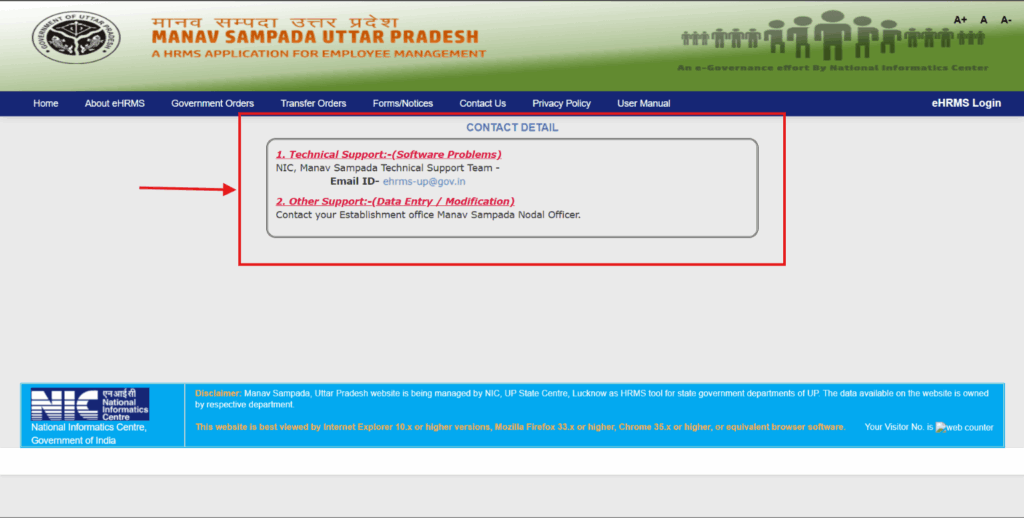
The Contact Us page lists two routes. For software problems, write to NIC’s Manav Sampada technical support team at ehrms-up@gov.in. For data entry or changes to your record, go to the Manav Sampada Nodal Officer in your establishment office.
There is no phone number on the page. Some websites print helpline numbers. They also provide a different email address. But, the official page shows only the email above, so use that.
Wrapping Up: Manav Sampada UP Without the Stress
Manav Sampada UP is a plain portal, and it only punishes one thing: leaving a task for the last day. The login needs four things: your department, User Id, password and captcha. Most other problems go to your nodal officer, whether it’s a missing account or a wrong date in your service book.
Bookmark the website ehrms.upsdc.gov.in right now. Once a year, open up your e-service book. Make sure to file your property return early so you don’t have to rush. If you do these three simple steps, managing the portal will only take five minutes of your time. If you’re also buying or registering property in UP, our property documents checklist is a good next read.
Frequently Asked Questions:
1. What is the official website of Manav Sampada UP?
The address is ehrms.upsdc.gov.in, and NIC’s UP State Centre in Lucknow runs it. Type it into the address bar yourself. A search ad can lead to a look-alike site.
2. Can I register myself on Manav Sampada UP?
You can’t. The login pop-up has no sign-up form, because your office creates the account. Ask your nodal officer to set it up or switch it on.
3. Why is my Manav Sampada UP login not working?
Start with three quick checks. Is the department right? Is the password typed correctly (the eye icon shows it)? Did you refresh the captcha? If it still fails, your nodal officer can look at the account, and ehrms-up@gov.in handles software errors.
4. How do I apply for leave on Manav Sampada UP?
Log in, open the Leave Module and fill in the form: leave type, dates, reason and your address during leave. Upload a document if the leave needs one, then submit. Your reporting officer approves or rejects it on the portal.
5. How do I download my pay slip from Manav Sampada UP?
After you log in:
- Go to Salary Details or Pay Slip.
- Choose the month and year you want to see.
- Click download or print to save your slip.
No slip showing? Ask your DDO.
6. How do I open my e-service book on Manav Sampada UP?
- Log in to your account.
- Open Employee Service Book Details on the dashboard.
- Enter your eHRMS code.
- Fill out the short form on the screen.
- Type the security code (captcha).
- Click Search.
7. Who do I contact if my e-service book has a mistake?
Your establishment office’s Manav Sampada Nodal Officer. The Contact Us page lists data entry and changes under that role.
8. Is Manav Sampada the same as eHRMS?
Manav Sampada is the name of UP’s eHRMS. The portal header calls it a HRMS application for employee management. Other states may run different portals, so use the one for UP.
9. Does Manav Sampada UP have a mobile app?
The home page has a Mobile App Users link under Statistics, so an app exists. Two guides call it m-Sthapana. Download only the app the official portal points to.