
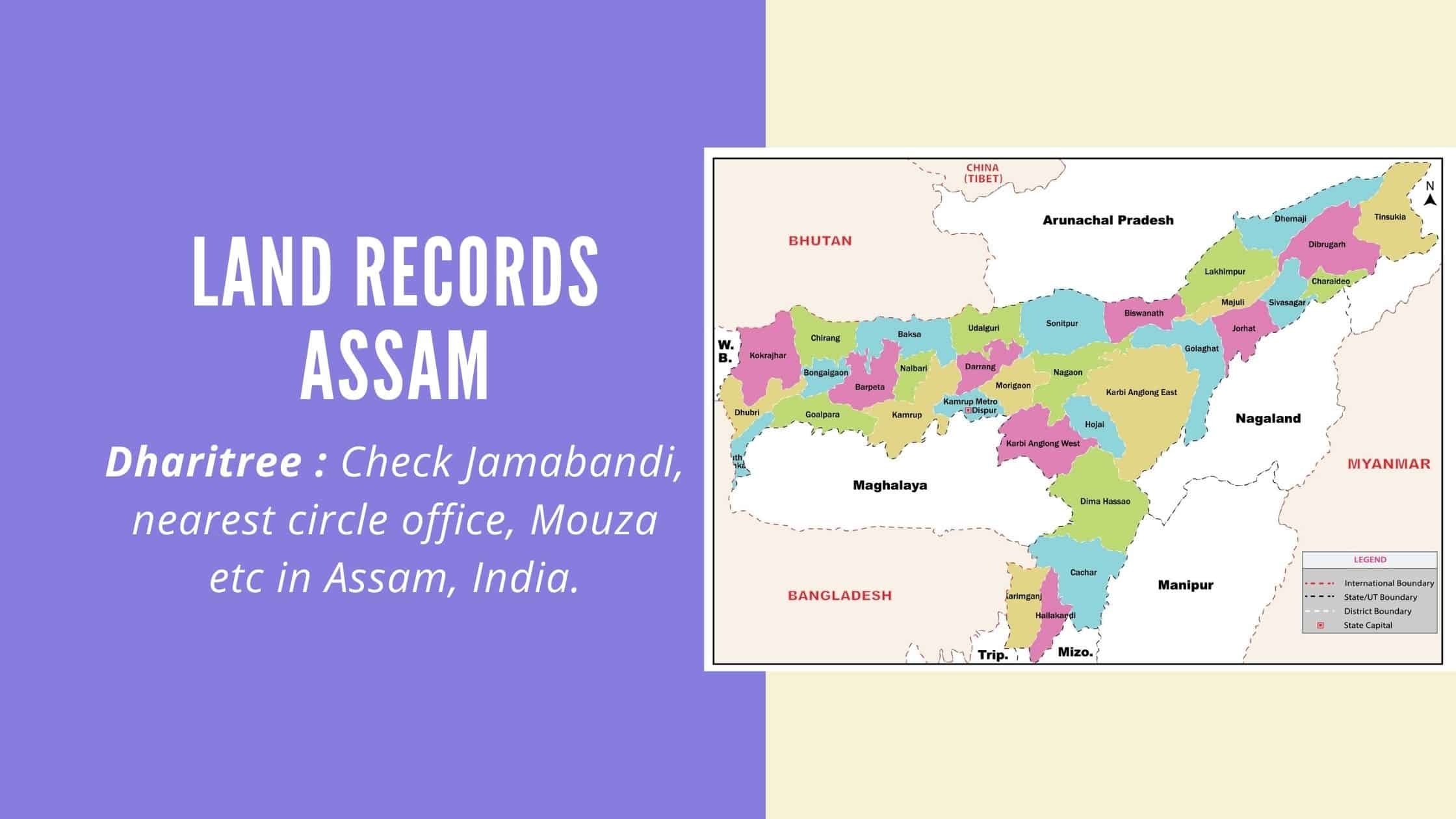
Not long ago, checking who owned a piece of land in Assam meant taking a day off, travelling to the circle office, and waiting in line behind a dozen other people with the same question. That changed on 7 October 2021, when the Assam government launched Dharitree, an integrated system built to put Jamabandi, mutation details and ownership records on a single screen. For the first time, a farmer in Barpeta and a property buyer in Guwahati could check a land record from the same website, without either of them stepping into a government office.
This guide walks you through Dharitree Assam in the way most people actually need it: how to check a land record online, what the portal’s different names mean, how NOC applications work, and what to do when your village simply isn’t on the system yet. Search Console data for this page shows that a large share of readers arrive confused about whether Dharitree, ILRMS and revenueassam.nic.in are three different websites or one, so we start there before getting into the step-by-step search process, Jamabandi, NOC and the mobile app.
- What Is Dharitree Assam?
- Why Was Dharitree Assam Launched?
- Documents and Services Available on Dharitree Assam
- How to Check Land Records on Dharitree Assam Portal
- How to Download Assam Land Map PDF
- How to Download Jamabandi and Get a Certified Copy
- How to Know Your Nearest Circle Office in Assam?
- Dharitree Jamabandi Assam: What It Shows
- Dharitree Assam NOC: Meaning, How to Apply and Track Status
- Other Official Assam Land Portals: Basundhara, NGDRS and More
- How to Check Land Records in Assam Offline
- Dharitree Assam Land Record App: Android and iOS Download
- Dag Number, Patta Number and Other Key Land Terms in Assam
- How to Correct Errors in Your Assam Land Record
- Wrapping Up
What Is Dharitree Assam?
Dharitree Assam is the Integrated Land Records Management System, usually shortened to ILRMS. It is the Assam government’s official online platform for land records, and it was launched by the Revenue and Disaster Management Department on 7 October 2021. Before Dharitree, land information in Assam sat in paper registers spread across circle offices, sub-registrar offices and the Directorate of Land Records, with no single point of access. The portal connects all of these offices so that a citizen can view, update and manage land information from one place instead of visiting several government departments in turn.
You will come across the portal written both as Dharitree Assam and Dharitri Assam. Both spellings refer to the same system, and both lead back to the same Jamabandi database, so it doesn’t matter which one you type into the search bar.
Some people also search for it as “Bhulekh Assam”, since Bhulekh is the common name for land records in many states. In Assam, however, the official system is Dharitree. Today, its home is the ILRMS portal at ilrms.assam.gov.in. The older address, revenueassam.nic.in, no longer works, so use ilrms.assam.gov.in for every service in this guide
|
Particulars |
Details |
|
Portal name |
Dharitree Assam / Dharitri Assam (ILRMS Assam) |
|
Official website |
revenueassam.nic.in (land record module: dharitree.assam.gov.in / ILRMS) |
|
Launched on |
October 7, 2021 |
|
Managing authority |
Revenue and Disaster Management Department, Government of Assam |
|
Nodal office |
Directorate of Land Records and Survey, Rupnagar, Guwahati-32 |
|
Helpline |
+91-361-2237273 |
|
Core services |
Jamabandi search, mutation status, NOC, Bhunaksha map, property registration |
|
Current ILRMS portal |
ilrms.assam.gov.in |
|
View Jamabandi |
ilrms.assam.gov.in/dhar |
|
Jamabandi in 22 languages |
landhub.assam.gov.in/jamabandiLanguage |
|
Land map (Bhunaksha) |
bhunaksha.assam.gov.in |
|
Certified copy of Jamabandi |
rtps.assam.gov.in |
|
NOC extension and objection |
noconline.assam.gov.in |
Why Was Dharitree Assam Launched?
The Dharitree portal was designed around four core purposes. The first is issuing No Objection Certificates for immovable property, which became mandatory under Section 21A of the Registration Act, and which used to require a separate, largely manual application process before Dharitree brought it online. The second is letting citizens update their land records digitally rather than filing paperwork in person every time a detail changes.
The third purpose is enabling property registration itself to happen through the same digital chain, so that a sale or transfer is reflected in the land record without a long delay between the registration event and the record catching up. The fourth is revenue collection: the department uses the same portal to collect land revenue from owners, replacing what used to be a manual, office-by-office collection process with a centralised, trackable one. Together, these four functions are why Dharitree is described as an integrated system rather than just a records lookup tool.
Documents and Services Available on Dharitree Assam
The range of services on Dharitree Assam has grown well beyond a simple record lookup. Citizens can apply for and download a No Objection Certificate for a proposed property transaction, search and view Jamabandi records for a specific plot, and initiate property registration requests through the same portal. The Bhunaksha Assam module, which shows the digitised cadastral map for a village, sits alongside the record search so that a plot’s location and its paperwork can be checked together rather than through two unrelated systems.
Beyond the record lookup itself, the portal lets applicants track the status of an NOC or mutation request instead of calling or visiting the circle office to ask. It also holds updated and archived versions of older land records as they get digitised, and because the whole workflow is online, the cost and time involved in a transfer, mutation or record-update request has come down noticeably compared with the fully manual process that existed before 2021.
How to Check Land Records on Dharitree Assam Portal
To check the land records on the Dharitri Assam Jamabandi portal, follow the steps mentioned below:
Step 1: Visit the official ILRMS Assam website, ilrms.assam.gov.in (earlier revenueassam.nic.in/ILRMS)
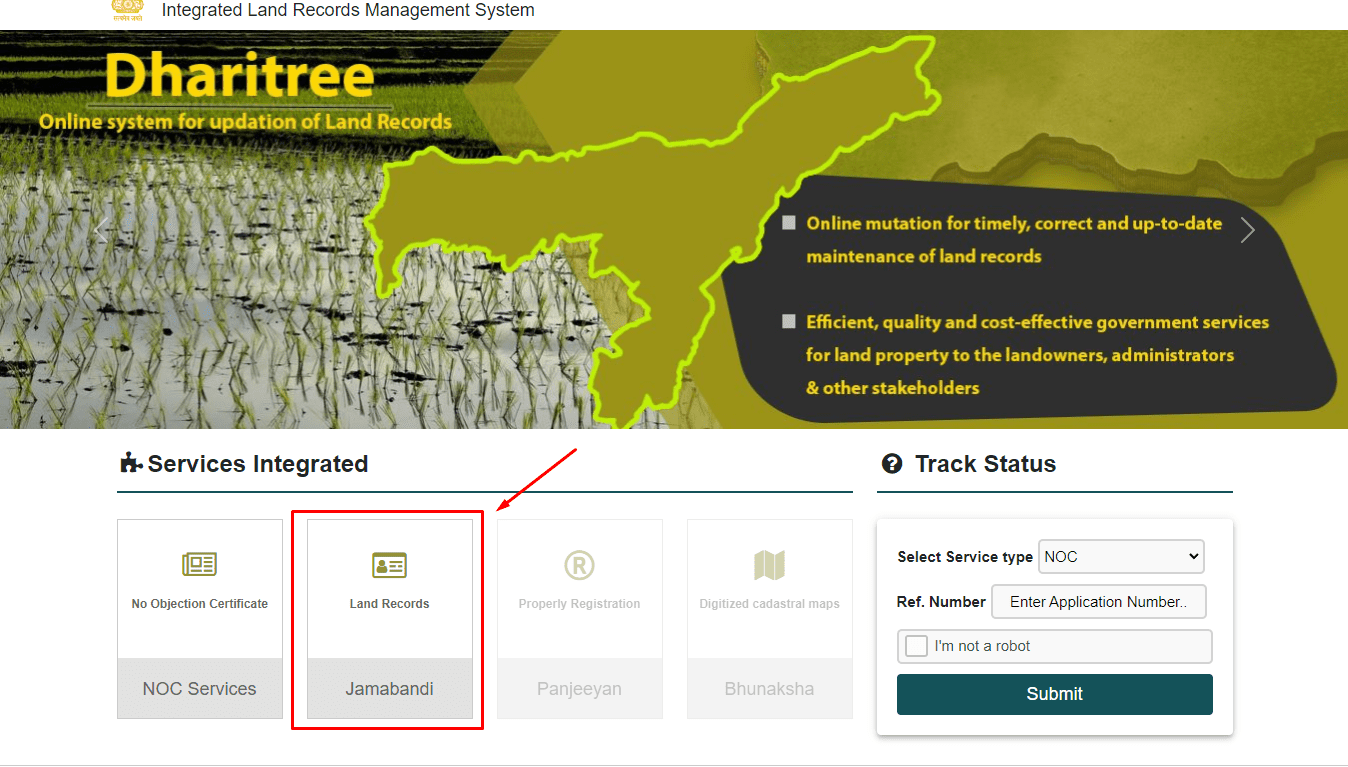
Step 2: On the homepage, look out for the option of ‘Jamabandi’ or’ Land Record’ and click on that option.
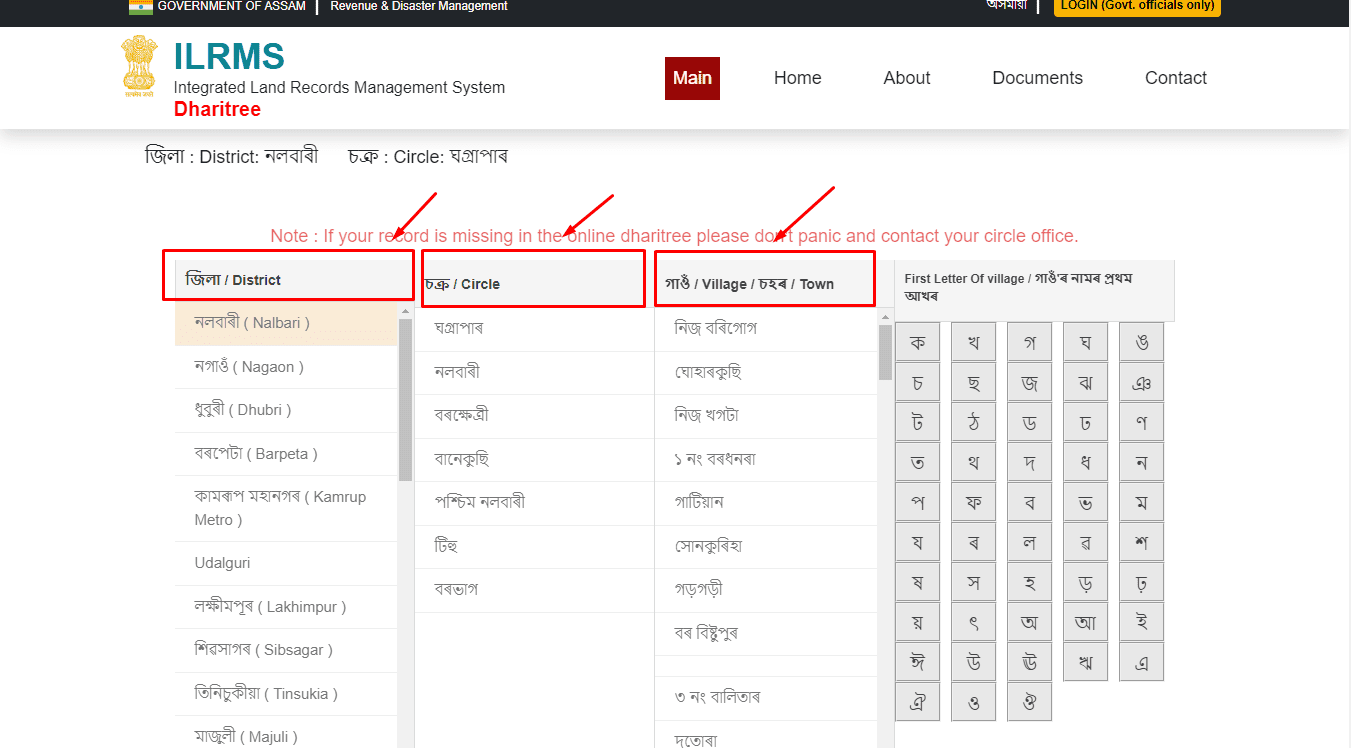
Step 3: In the new window, choose your district’s name in the left column of the webpage. After selecting the district, the circles’ list will appear on the screen.
Step 4: Select the name of your circle. And then, select the village name from the list that is available on the right side of the screen.
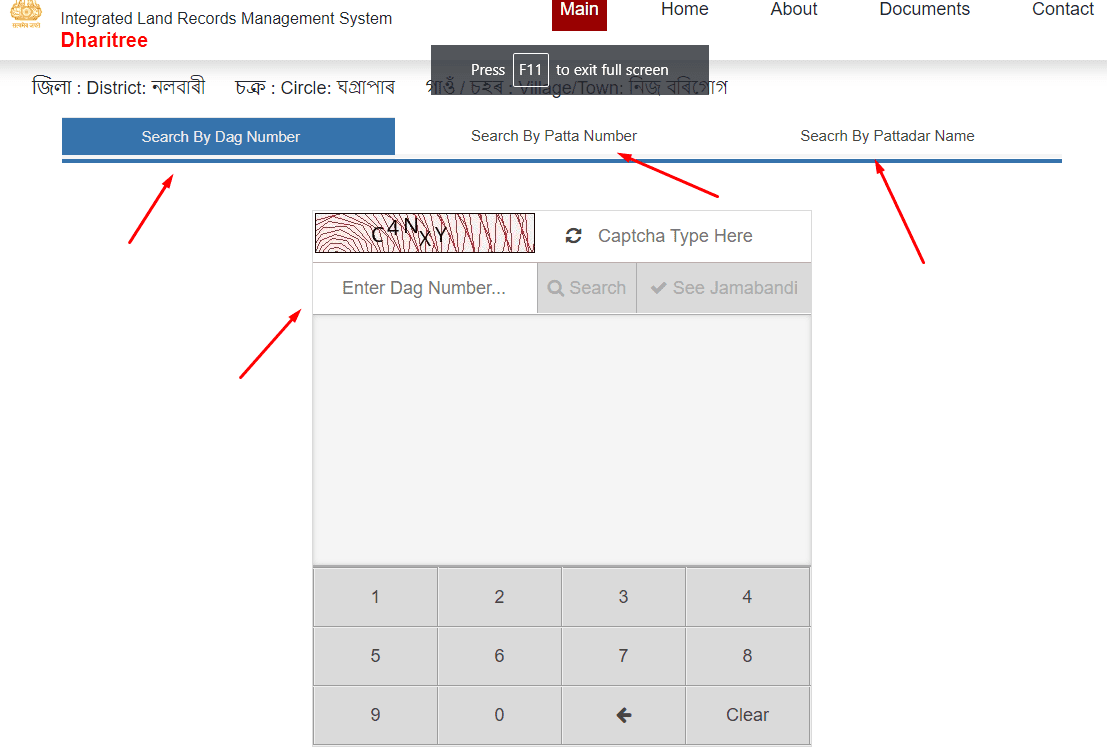
Step 5: On the new page, enter the details asked, like the Dag number. Then, enter the correct captcha, and click on the’search’ button.
If you do not know the Dag number, you can also opt to search for the land records in Assam via the Pattadar name or Patta number.
Step 6: The list of records will then appear on the screen, and you can click on the jamabandi you are looking for.
Tip: The quickest direct link to this search page is ilrms.assam.gov.in/dhar, titled “Dharitree Services for Citizen”. If your record doesn’t show up there, don’t panic. As the portal itself advises, some records are still being added, so contact your circle office.
Check Assam Land Record by Dag Number
If you already have the Dag number printed on your papers, this is the fastest route through the system. On the village search page, choose ‘Dag Number’ as the search type, and enter the number exactly as it appears on your documents, since even small formatting mismatches can cause the search to come back empty. After completing the captcha and submitting the form, the Jamabandi entry tied to that Dag number opens directly, without you needing to browse a longer list of results.
Land Record Search by Name in Assam
Not everyone has the Dag number handy, especially for inherited land or older family holdings, and that’s where a name-based search is useful. Switch the search type on the village page to Pattadar Name, and enter the landowner’s name as it’s recorded in government documents. Spelling matters here more than people expect; a name recorded with a slightly different transliteration can return no results even when the land record genuinely exists, so it’s worth trying a couple of reasonable variations before assuming the record isn’t digitised. Once you’ve entered the district, circle, village and name correctly, submitting the form returns any matching Jamabandi entries.
How to View the Assam Land Record Map (Bhunaksha)
Bhunaksha Assam is the digitised cadastral map that sits alongside the Dharitree land record system, and it’s what people usually mean when they search for an Assam land record map. From the ILRMS homepage, look for the map or Bhunaksha option, and work through the same district, circle and village selection you’d use for a Jamabandi search. The map that comes up shows individual plot boundaries plotted against the Dag number, which makes it useful for confirming a plot’s shape, its neighbours, and its position relative to nearby land before you rely on the paper description alone. Cross-checking the map against the Jamabandi entry is a good habit whenever a plot boundary is even slightly in question.
How to Download Assam Land Map PDF
Want to keep a copy of the map, or share it with a buyer or a lawyer? You can download it as a PDF directly from Bhunaksha Assam.
- Go to bhunaksha.assam.gov.in, or open Bhunaksha from the ILRMS homepage.
- Select your district, circle and village.
- Find your plot on the map, or search for it by Dag number.
- Click the plot to open its Dag details. These show the Dag number, village, location code and ULPIN.
- Click Download PDF to save the map and plot details.
Keep in mind that this downloaded map is for reference. For any legal use, rely on the certified Jamabandi and, where needed, a survey by the circle office.
How to Download Jamabandi and Get a Certified Copy
Once your Jamabandi opens on screen, you can save it in two ways, depending on why you need it.
|
What you need |
Where to get it |
Good for |
|
A quick copy to read or share |
ilrms.assam.gov.in/dhar, then print or save as PDF from your browser |
Personal checks before a deal |
|
A copy in your own language |
landhub.assam.gov.in/jamabandiLanguage, which shows the Jamabandi in 22 languages |
Readers who don’t read Assamese |
|
A certified copy |
rtps.assam.gov.in (online application) |
Banks, courts and official use |
The certified copy is the one that carries legal weight. According to the Dharitree portal, you can apply for it online through RTPS Assam, and no visit to the service delivery office is needed.
How to Know Your Nearest Circle Office in Assam?
The steps to know your Jamabandi Assam circle office are as follows:
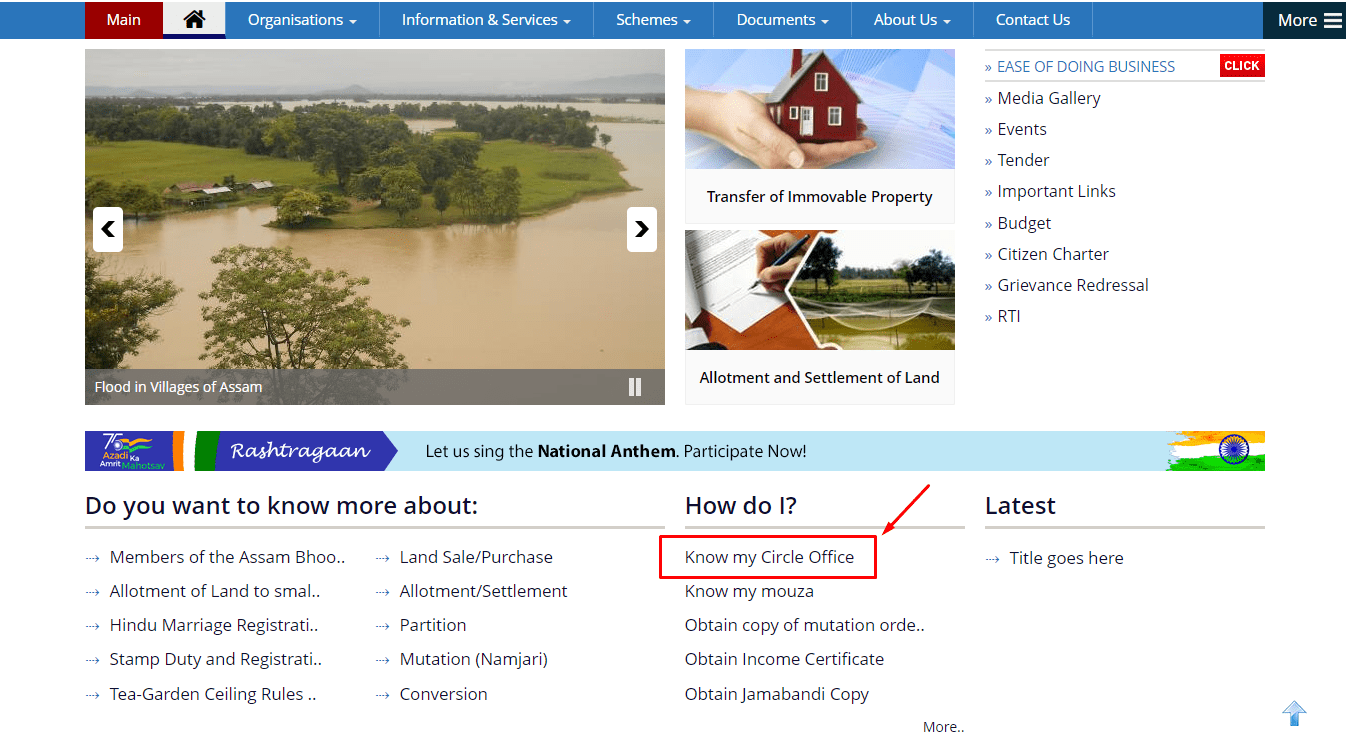
Step 1: Visit the official land revenue portal of Assam, landrevenue.assam.gov.in.
Step 2: Go to the ‘How Do I?’ section on the homepage and click on ‘Know My Circle Office’ from the menu.
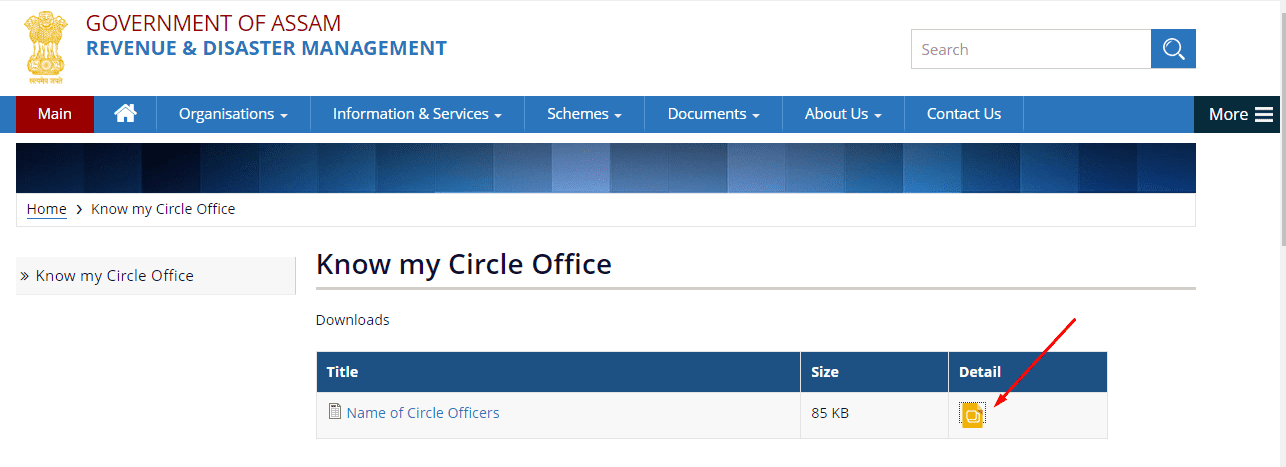
Step 3: On the new page, click on the ‘Details’ option. All the details of the city’s circle office will be displayed on the screen.
Dharitree Jamabandi Assam: What It Shows
Jamabandi, also called the record of rights or RoR, is the core document the entire Dharitree system is built around. A dharitri Assam jamabandi entry typically lists the Pattadar’s name, the Dag number and Patta number of the plot, the land’s classification (whether it’s agricultural, homestead, or another category) and its area, along with the Mouza and village it falls under. Where ownership has changed hands, either through a sale, inheritance or gift, that change is meant to appear as a mutation entry against the original record.
Checking mutation status works the same way as any other Jamabandi search: by Dag number, Patta number, or owner name, from the village search page. If a transaction has gone through but the mutation hasn’t been recorded yet, that’s usually a sign to follow up at the circle office rather than assume the digital record is simply behind, since mutation delays can occasionally point to an incomplete or contested transfer.
Dharitree Assam NOC: Meaning, How to Apply and Track Status
A No Objection Certificate confirms that a property carries no outstanding liabilities and is free to go through a sale, gift, mortgage or rental transaction. Under the Registration Act, most property deeds in Assam cannot be registered by the Sub-Registrar without one. The circle office assists the District Registrar in verifying the property, checking it against existing records for any dues or disputes, and the NOC is generally issued within around 30 days of the application, provided nothing outstanding turns up during that check.
Tracking a Dharitree Assam NOC application is straightforward once you have the reference number from your initial submission. On the portal, click ‘Track Status’ on the right side of the panel, enter the service type and reference number, and verify with your registered mobile number when prompted. The page that follows shows the current status of your application, so there’s no need to call the circle office just to check where things stand.
If the NOC hasn’t been used within its validity window, an extension can be requested through the same portal.Go to the ILRMS portal (ilrms.assam.gov.in) and open Extension of NOC under the NOC section, which takes you to noconline.assam.gov.in. Then choose Proceed, then enter the original application number along with your phone number and follow the instructions that appear. Once an NOC is issued, registration of the underlying sale typically needs to be completed within 120 days, along with payment of the applicable stamp duty and registration fee, so it’s worth timing the NOC application to line up with when you actually plan to register the deed.
On the current ILRMS portal, both “Extension of NOC” and “Objection Petition” are listed under the NOC section, and they open on noconline.assam.gov.in. An objection petition is useful if you believe an NOC is being sought on land you have a claim to.
Other Official Assam Land Portals: Basundhara, NGDRS and More
The ILRMS homepage links to a few more official systems. Each one has a different job, so here’s a quick guide.
|
Portal |
What it is for |
|
Dharitree (ilrms.assam.gov.in/dhar) |
Viewing Jamabandi and land records |
|
Bhunaksha (bhunaksha.assam.gov.in) |
Viewing and downloading cadastral land maps |
|
Basundhara (basundhara.assam.gov.in) |
Services under Mission Basundhara, the state’s drive to update land records and settle land-related applications online |
|
NGDRS (ngdrs.assam.gov.in) |
Property registration |
|
NOC Online (noconline.assam.gov.in) |
NOC extension and objection petitions |
|
RTPS Assam (rtps.assam.gov.in) |
Certified copy of Jamabandi |
|
Legacy deed records (on Basundhara) |
Viewing older property registration records |
One thing that confuses many users is “Dharitree Single Sign”. This is a login for government officials who update land records, not for the public. As a citizen, you don’t need any login to view a Jamabandi or a land map.
How to Check Land Records in Assam Offline
Assam has been digitising villages in phases since Dharitree launched in 2021, and a portion of villages still isn’t searchable on the portal. If your village doesn’t show up in the list on the Dharitree services for citizen page, the online route simply won’t work yet, and the offline process is the only option. Visit the local circle office covering your area, write your request on plain paper, attach the required court-fee stamp, and submit it to the circle officer directly. The application is typically assigned to a dealing assistant or Lot Mandal, logged into the Dharitree system through its Citizen-Centric Certificate module, and you’ll receive an acknowledgement along with a fee receipt showing the expected delivery date for your physical Jamabandi copy.
Dharitree Assam Land Record App: Android and iOS Download
Alongside the website, a Dharitree Assam land record app is available for people who’d rather check records from a phone than a browser. On Android, searching for ‘Dharitree Assam Land Record’ on the Google Play Store brings up the relevant listing, and on iOS, the equivalent app is listed on the Apple App Store as ‘Assam Land Record – Dharitree’. Both versions let you search by district, circle, village or Pattadar name, and view Jamabandi details without needing to sit down at a computer, which is useful for anyone checking records while travelling or working away from home.
Because a few unofficial land-record apps also exist for Assam, it’s worth checking that the listing you’re installing is well-reviewed and matches the official portal’s branding before you enter any personal details into it. For anything with legal or financial consequences, such as verifying ownership before a purchase or applying for an NOC, it’s still worth cross-checking the result against the website directly, since the ILRMS portal at ilrms.assam.gov.in remains the authoritative source.
Other State wise Land Records in India
| Karnataka | Bhoomi Online RTC |
| Chhattisgarh | CG Bhuiya |
| Uttarakhand | Bhulekh UK |
| Punjab | PLRS |
| Madhya Pradesh | Bhulekh MP |
| West Bengal | Banglarbhumi |
| Odisha | Bhulekh Odisha |
| Bihar | Land Record Bihar |
| Jharkhand | Jharbhoomi |
| Tamilnadu | Patta Chitta |
| Maharashtra | Mahabhulekh |
| Telangana | Dharani |
| Gujarat | AnyROR |
Dag Number, Patta Number and Other Key Land Terms in Assam
What Are Dag Number and Patta Number?
The Dag number is a unique identification number the Assam government assigns to every individual land parcel, and it functions much like what is called the Khasra number in parts of northern India. Because it identifies a specific plot rather than a person, it’s the quickest and most reliable way to look up a Jamabandi record, provided you have it written down correctly.
The Patta number, by contrast, is tied to ownership rather than to the plot itself. It’s issued to a landowner as formal proof of legal ownership once a parcel has been allotted or transferred to them. In 2021, the Assam government ran a large-scale Patta distribution programme aimed at landless families, after a government review found that a very large share of residents at the time had no formal proof of ownership over land they had occupied and cultivated for years.
Who Is a Pattadar?
A Pattadar is the person who holds a land ownership certificate, or Patta, for a given plot in Assam. Each land parcel typically has one Pattadar of record listed against it in the Jamabandi, and that name is exactly what you’re matching against when you run a land record search by name rather than by Dag number.
What Is Mouza in Assam?
A Mouza is a revenue administrative unit within a district, and it’s a broader category than a single village. Mouza and Gaon (village) aren’t interchangeable terms: a Mouza can never be a single village on its own, but a group of several villages together can form one Mouza. The government appoints Mouzadars at the sub-divisional or district level to collect land revenue from the Mouzas under their charge, and this administrative layer is part of why land records in Assam are organised the way they are, with district, circle, Mouza and village all forming part of a plot’s full address.
What Is Chitha in Assam?
Chitha refers to the field-level survey record tied to a Mouza, and it’s sometimes needed alongside the Jamabandi when applying for certain services or resolving discrepancies in a plot’s details. Revised Chitha forms are available through the official land revenue Assam website: open the ‘Document’ section, select the Main Department category, and download the specific form you need from the list.
What Is ULPIN?
ULPIN stands for Unique Land Parcel Identification Number. It is a 14-digit alphanumeric ID given to each land parcel under the Digital India Land Records Modernisation Programme, which is why it is also called Bhu-Aadhaar. In Assam, you’ll see the ULPIN in the Dag details on Bhunaksha. It works alongside the Dag number, so keep both on record when you deal with a plot.
How to Correct Errors in Your Assam Land Record
Errors in a Jamabandi entry are more common than people expect, especially in records that were only recently digitised from older paper registers. A misspelled owner name, a transposed digit in the Dag number, or an area that doesn’t match a resurvey are all reasons to file a correction rather than simply living with an inaccurate record. The process starts at the circle office where the land is registered, since corrections aren’t handled centrally through the website.
At the circle office, you’ll need to collect and fill out the correction application form, describing the specific error clearly, whether it’s an incorrect owner name, a wrong Dag number, a mismatch against the survey, or an inaccurate land area. Supporting documents strengthen the application considerably, so it helps to attach a copy of the Patta, the existing Jamabandi, the sale deed if the error relates to a recent transfer, and a recent tax receipt. From there, the Lot Mandal reviews the application, checks it against the underlying records, and forwards it to the circle officer, who either approves the correction or asks for further documentation before the record is formally updated.
Buying land in Assam? A Jamabandi check is the first step. For a fuller check before you pay an advance, you can also use Square Yards Title Search and Litigation Search to look for ownership gaps or pending court cases.
Wrapping Up
Dharitree Assam has turned what used to be a multi-day circle-office visit into a search you can finish from your phone in a couple of minutes. Whether you search by Dag number, Patta number or Pattadar name, the underlying process on ilrms.assam.gov.in (earlier revenueassam.nic.in) stays consistent: pick your district, circle and village, then pull up the Jamabandi entry you need. The naming confusion between Dharitree, ILRMS and revenueassam.nic.in trips up a lot of first-time users, but once you know they all lead to the same land record database, the rest of the portal is fairly easy to navigate.
For NOC applications, mutation checks, Bhunaksha maps or record corrections, the portal and its Android and iOS apps now cover most of Assam’s digitised villages. For the villages still waiting on digitisation, your local circle office remains the reliable fallback, and it’s worth confirming your circle office’s details in advance so an offline request doesn’t turn into a wasted trip.
Frequently Asked Questions:
1. What is Dharitree Assam?
Dharitree Assam is the state’s Integrated Land Records Management System (ILRMS), an official online portal launched on 7 October 2021 for checking Jamabandi, applying for NOCs, viewing Bhunaksha maps and managing land records across Assam.
2. What is revenueassam.nic.in dharitree?
Revenueassam.nic.in was the earlier website of the Revenue and Disaster Management Department for Dharitree and ILRMS. That address is no longer active, and the same land record system now runs at ilrms.assam.gov.in. They are part of the same system, not two separate portals.
3. How do I check land records in Assam online?
Go to ilrms.assam.gov.in, click View Jamabandi copy, choose your district, circle and village, then search by Dag number, Patta number or Pattadar name after completing the captcha.
4. How can I search Assam land records by Dag number?
On the village search page of Dharitree, select Dag Number as the search type, enter the number exactly as shown on your papers, complete the captcha and submit to open the matching Jamabandi record directly.
5. Can I search Assam land records by owner name?
Yes. Switch the search type on the Dharitree village page to Pattadar Name, enter the owner’s name along with the district, circle and village, and submit the form to view any matching records.
6. What is Dharitree Assam NOC?
It is a No Objection Certificate confirming a property carries no outstanding liabilities, required under Section 21A of the Registration Act before most sale, gift or mortgage deeds can be registered in Assam. It is usually issued within about 30 days of the application.
7. How do I check my Dharitree Assam NOC status?
On the Dharitree portal, click Track Status, enter your service type and reference number, verify using your registered mobile number, and the current status of your NOC application will be displayed.
8. What if my village is not listed on Dharitree Assam?
Some villages haven’t been digitised yet. Visit the local circle office, submit a plain-paper application with the required court-fee stamp, and request a physical copy of your Jamabandi record.
9. How do I correct an error in my Assam land record?
Visit the circle office where the land is registered, fill the correction application form describing the error, attach supporting documents like the Patta copy and sale deed, and the Lot Mandal will review it before forwarding it for approval.
10. How do I download the Assam land map PDF?
Open bhunaksha.assam.gov.in, select your district, circle and village, and click your plot or search by Dag number. In the Dag details that open, click Download PDF to save the map.
11. How do I download my Jamabandi in Assam?
Open your Jamabandi on ilrms.assam.gov.in/dhar and save it as a PDF from your browser for personal use. For a certified copy that banks and courts accept, apply online at rtps.assam.gov.in.
12. Can I view Assam Jamabandi in English or Hindi?
Yes. The Landhub page at landhub.assam.gov.in/jamabandiLanguage lets you view a Jamabandi copy with transliteration in 22 languages.
13. Where can I see Assam's land record services online?
All of Assam’s land record services are on the official ILRMS portal at ilrms.assam.gov.in, which replaced the older revenueassam.nic.in address. To check your record, choose “View Jamabandi copy” under Other Services. The same portal also links to Bhunaksha maps, NOC services and certified copies.
14. What is Dharitree Single Sign?
Dharitree Single Sign is a login meant for government officials who update land records. Citizens don’t need it. You can view Jamabandi and land maps without any login.
15. Is Bhulekh Assam the same as Dharitree?
Yes, for most people. “Bhulekh” is a common name for land records in many states, but in Assam the official land record system is called Dharitree, under ILRMS.